Claude Fable 5 went offline on June 12, 2026, when United States export controls hit Anthropic’s newest models, and came back on July 1. In between was one claim from launch day worth testing: Crosby, an AI native law firm, reported from blind review that Fable’s redlines “matched or beat our current model every time.” This page is the recorded test of that claim on one piece of firm work. An inbound NDA goes into one folder, one typed command runs, and the contract comes back redlined against eight positions written in the firm’s own words. Everything below is the run as it was recorded, screen by screen, with the honest limits and the Opus 4.8 comparison included.
Step 1: Pick the model
The setup is a few clicks and one toggle, and it is where the firm’s data posture gets set before any document goes in.
-
Install the Claude desktop app
Search for the Claude download page and install the Mac or Windows app on a paid plan. At the top of the app there are three tabs, and this build works in the "Code" tab. You never write any code there; if you can use the regular Claude chat, you can run this.
Result: The app is open in the "Code" tab.
-
Point the app at a working folder
When the session starts, select the folder the app will work inside. In the recorded build it is a folder named contract-review, and it can live anywhere on your computer. This one folder will hold the positions file, the skill, and every contract you drop in.
Result: The session header shows the folder name.
-
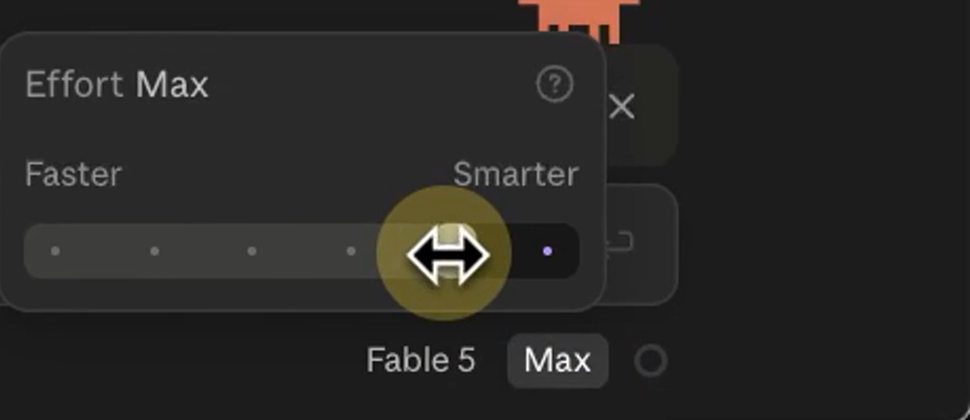
Pick Fable 5 and set the effort to the max setting
The model picker sits at the bottom of the chat box. Set the model, then set the effort control to its highest setting, the most powerful one.
Result: The chips under the chat box read "Fable 5" and "Max".
-
Know the July 7 line before you rely on it
Anthropic's June 30 post, updated July 1, said Fable 5 was included for up to half of weekly usage limits on paid plans through July 7, 2026, and runs on usage credits after that: a pay as you go balance behind one switch in your settings. Check the current wording the day you set this up.
Result: Your firm can keep running Fable 5 past the included window.
-
Turn off model training before any document goes in
In the privacy settings, the toggle reads "Help improve our AI models" in the recorded build. With it off, Anthropic states new chats and coding sessions are not used to train its models. Confirm where yours stands and note the date; the wording and the path move often.
In the app: Your name (settings menu) → Settings → Privacy
Result: Training on your chats is off before the first contract goes in.
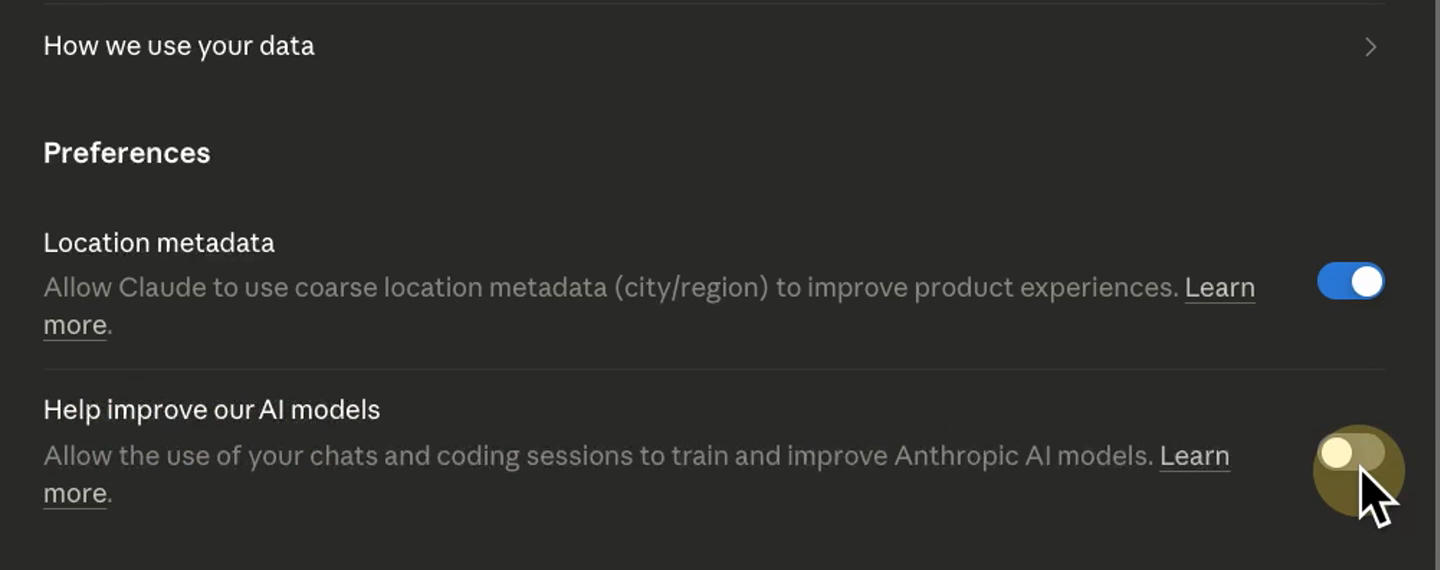
One sentence of caution on that toggle, because settings pages move: confirm where yours stands the day you set up, and write the date down. The verdict later on this page does not depend on it; your firm’s data posture does.
Step 2: The firm playbook
Every review this system runs is checked against one file, and you should read that file before you trust anything the review says.
hi-
Type anything to open the files view
Send one short message, the word hi or anything else. The icon in the top right corner appears; click it, then click "Files". The panel mirrors the working folder exactly: what you see there is what sits in the folder on disk.
Result: The files view shows two things: firm-positions.md and a folder named .claude with the skill inside.
-
Read the positions file
Open firm-positions.md. It holds eight positions in plain English, and each one carries a severity, which is how strongly the review should flag it. The shape per position: what is acceptable, and what to push back on.
Result: You know exactly what every review from here on runs on.
-
Make it yours
Edit the file in the folder, or open it in the app and make the edit there, and save. Change a position once and every review after that runs on the updated one. This file is the reason the redlines land on your firm's terms instead of generic AI best practices.
Result: The playbook says what your firm would say.
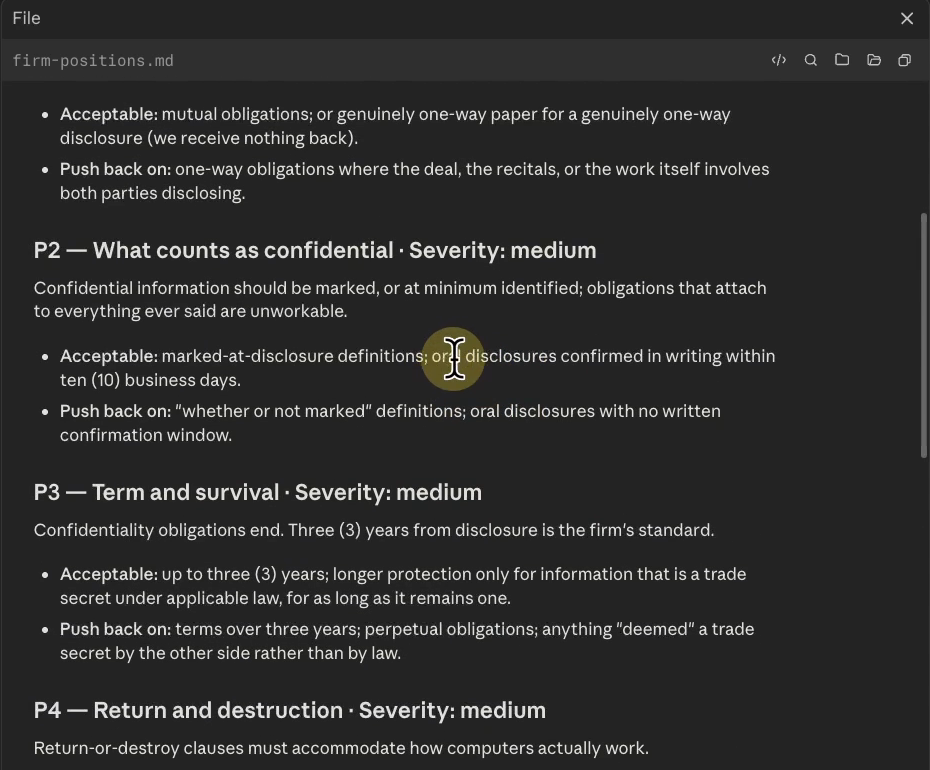
The severities matter. A high severity position produces the red findings; a medium one produces the yellow ones. The review inherits the priority your firm chose, position by position.
Step 3: Run the review
Once the folder is set and the playbook is read, the review itself is the shortest step on this page.
-
Drop the contract into the folder
Drag the NDA into the working folder. If your matter lives in Clio or another system, export the file first and drop it in the same way. If you are practicing instead, ask Claude to generate a fake matter for you: fake documents on a real workflow, so no client data touches the tool while your firm settles its AI policy.
Result: The contract shows up in the files view beside the positions file.
-
Type /redline-contract and press enter
That is the entire instruction. Every clause gets checked against the playbook you just read: green is passing, yellow needs a look, red is the highest priority. Where it cannot verify something, it flags it instead of guessing.
Result: The review runs on its own from here.
-
If anything errors, paste it back
You do not troubleshoot this yourself. Copy the error into the same chat and let Claude fix its own run. While it works, you can open the skill file and read it: plain text, the firm's contract review written down once, so every review starts from the same written process. When your firm needs a skill that does not exist yet, you describe the process in the chat and ask Claude to turn it into one.
Result: Errors are handled inside the same session.
-
Come back in about 8 minutes
The recorded run took about 8 minutes end to end on a 12 section NDA. It hands back two files: the ranked risk memo, which opens as a page in your browser, and the redlined contract as a Word document beside the original.
Result: On this run the memo counted 17 clauses reviewed, 12 redlines made, 2 red flags, and 2 items needing a lawyer's input.
/redline-contract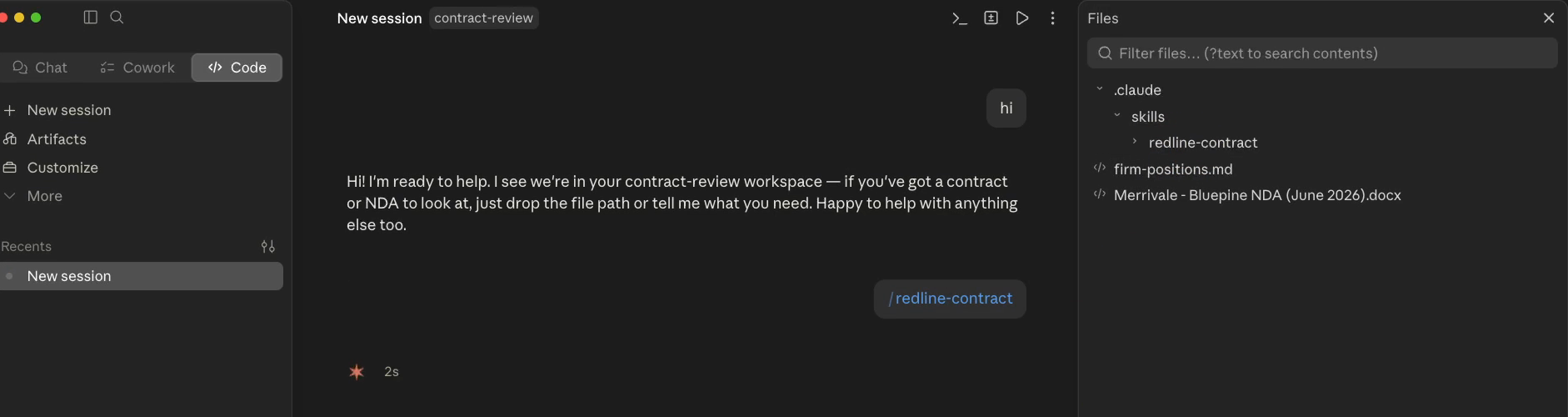
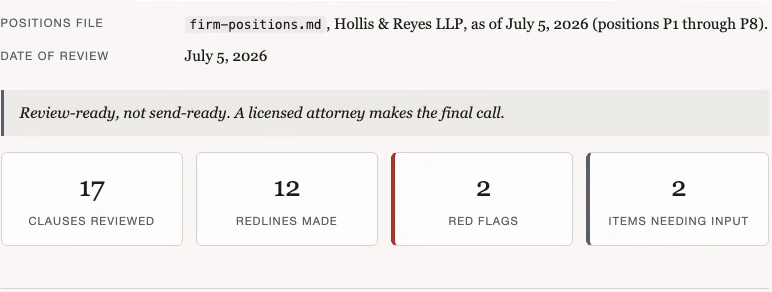
The memo ranks every finding from red to green, and each card gives three things: what the clause says, which position it violates, and the exact edit made in the document. Below the ranked cards sits the section where the run makes no edits: the items it could not verify, each with what is missing and what to request from the other side. In the recorded run there were two, a missing exhibit and an unprovided security standard, and neither clause received a single edit.
Step 4: Open the redline in Word
The redline saves beside the original as a Word document, and nothing about your firm’s review workflow changes.
-
Open the redline in Word
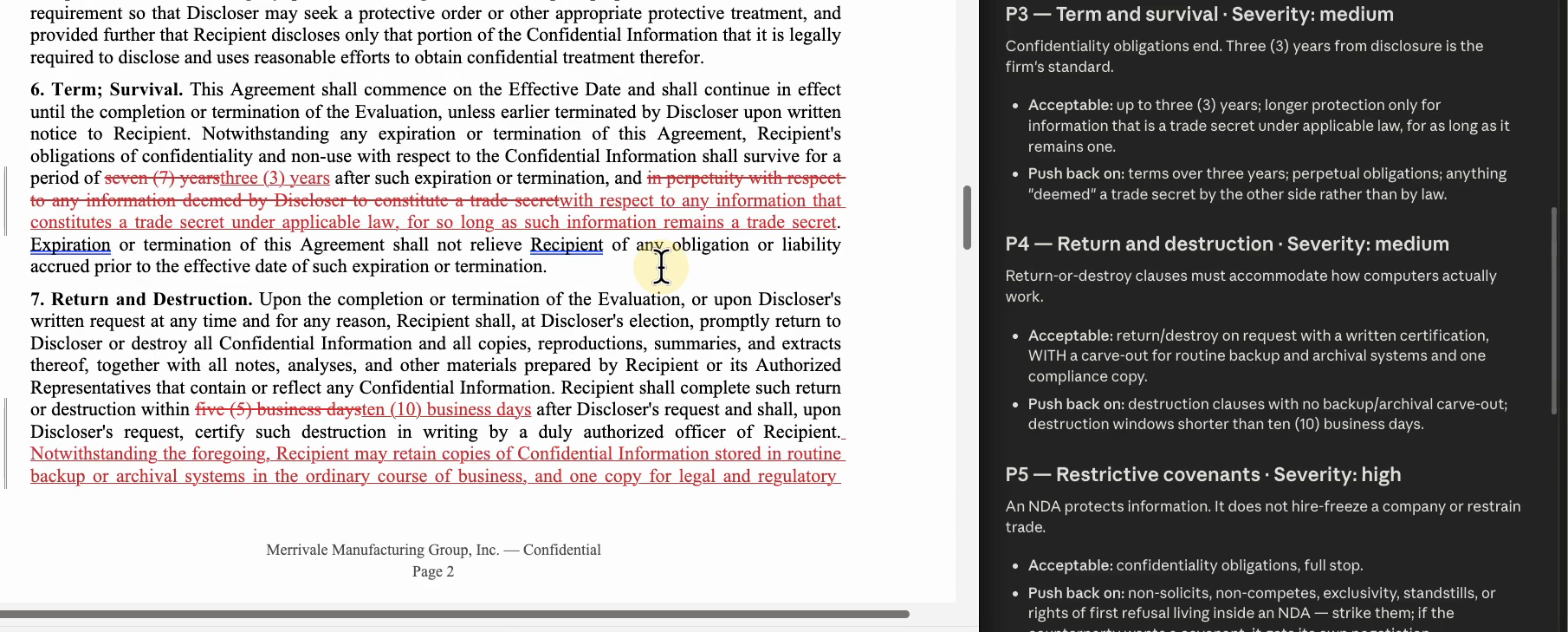
The redline sits in the folder next to the original, as a Word document. The markings are native tracked changes: deletions struck through, insertions beside them, handled with the same review tools your firm already uses.
Result: The redlined NDA is open with every change marked for review.
-
Check its work against the playbook
Take two changes and trace them. In section 6, the contract's seven year confidentiality term is struck to three years because the firm's standard is three. In section 7, five business days to destroy every copy becomes ten, with a carve-out written in for routine backups plus one compliance copy, exactly what the return and destruction position requires.
Result: Each edit traces back to the position that required it.
-
See who authored the changes
Click any tracked change and read its card. In the recorded build every change is authored by the firm and dated with the run, the same as edits from a colleague would be.
Result: The suggestion card names the firm as author with the run's date.
-
Accept or reject each change, and have a lawyer sign
Accept or reject the changes one by one. The clauses it could not verify carry no edit at all; those were flagged in the memo instead. The redline is review-ready, never send-ready: a licensed attorney approves everything before it leaves the firm.
Result: A reviewed redline, with the memo as its paper trail.
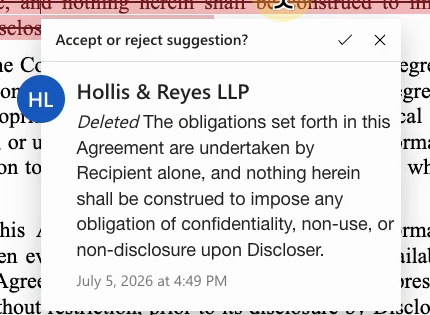
This is the working difference from pasting a contract into a chat window. A chat gives you advice back, you retype every change into the document yourself, and the advice rests on generic best practices rather than your positions. Here the changes are already in the contract as tracked changes, and each one traces to the playbook. Claude does the drafting hours; your attorneys spend their minutes on the judgment calls.
The verdict: Fable 5 against Opus 4.8
Read how Harvey grades before you read the numbers. Their Legal Agent Benchmark uses an all-pass standard: the model completes an entire legal task end to end, or the task counts as a fail. That grading is why every number on the chart looks low, and it is what makes the chart honest.
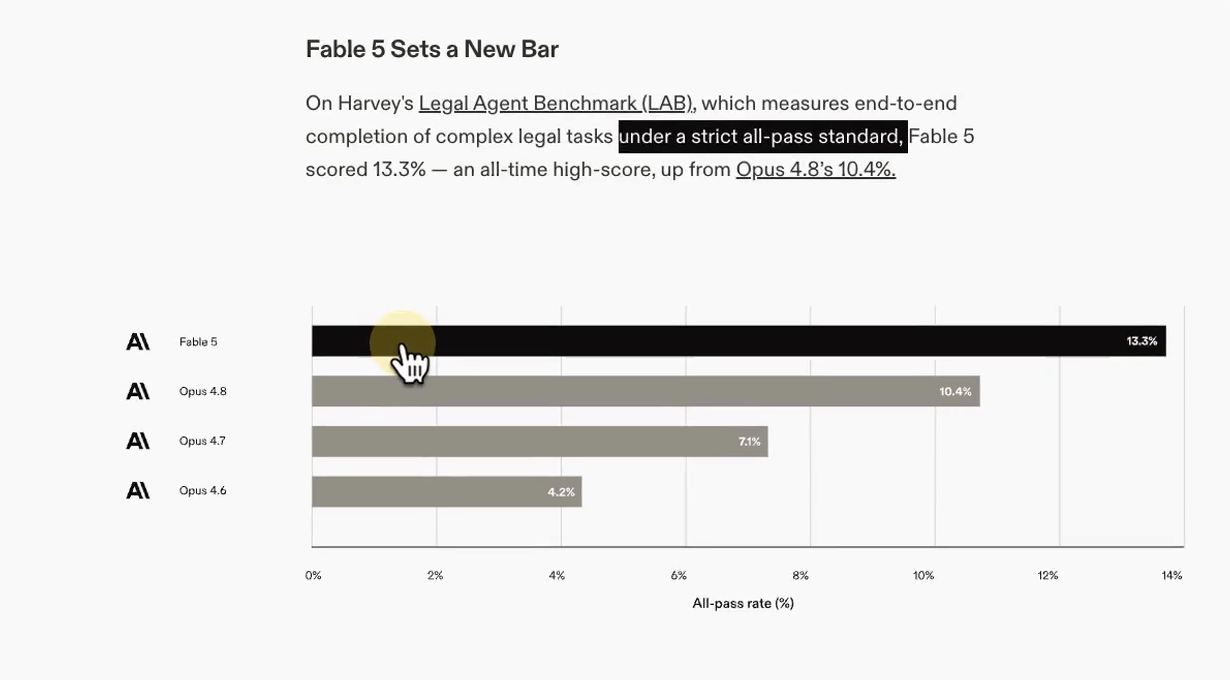
The second half of the verdict ran on this build’s own NDA. Before the recording, the same contract and the same playbook went through Opus 4.8, the strongest Claude model before this one. Opus is honestly good at this: it called both red flags and flagged the same two items needing input. On the big catches, the two models performed the same on this small test. The differences sat in the details, and all three are checkable on screen.
| Checked on the same NDA | Claude Fable 5 | Opus 4.8 |
|---|---|---|
| Section 3: the one way disclaimer | Struck the sentence in the redline and routed the full rewrite as a redraft note | Called the mutuality problem in its memo and made no tracked change |
| Section 9: the buried non-solicit | Struck the covenant and conformed the heading to "Coordination of Communications" | Struck the covenant; its card does not mention the heading |
| Section 11: the venue objection waiver | Flagged it yellow: no written position covers it, attorney judgment required | Accepted the section as "P8 satisfied" and moved on |
| Harvey LAB, all-pass grading | 13.3% | 10.4% |
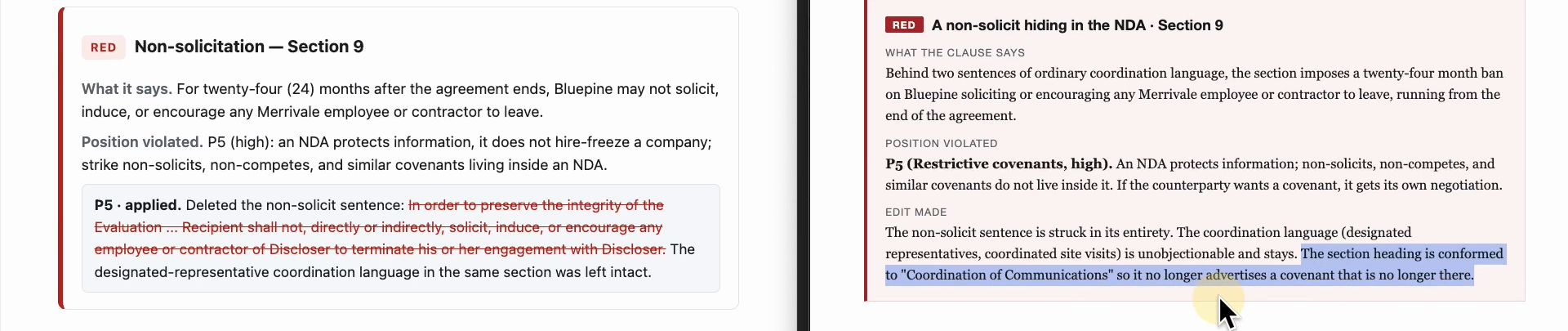
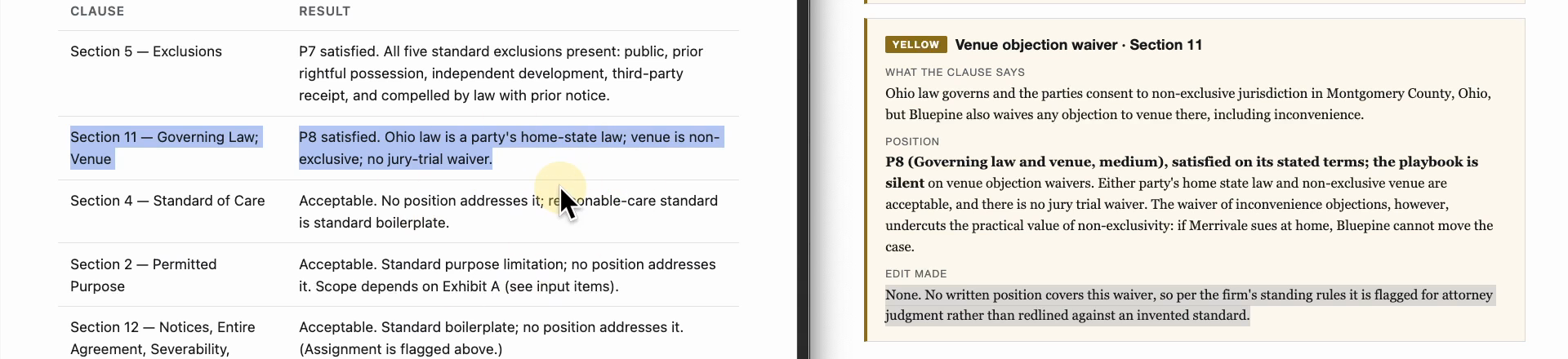
That is the verdict this page can actually show, rather than report: it lines up with Crosby’s “matched or beat”, not with a dramatic gap. The pattern across the three differences is thoroughness. Anthropic built Fable 5 for long running work, so on bigger documents and longer reviews that thoroughness usually counts for more.
Honest limits
- It needs Word going in. Tracked changes require a .docx contract; a PDF or plain text contract still gets the full memo and the list of edits, not a redlined Word document.
- The shipped playbook covers NDAs only. For other contract types, someone at your firm writes the positions first. That is real work, and it is also why the reviews are worth trusting: every edit traces to a position your firm wrote.
- Everything it produces is a draft, and the whole workflow lives in one folder on one computer: nothing connects to Clio or your document system on its own, nothing runs on its own, and someone starts each review one contract at a time. Review-ready, never send-ready; a licensed attorney approves everything before it leaves the firm.
Start small. One person, one subscription plan, one contract. Run one real NDA next to your normal review and judge the redline for yourself.