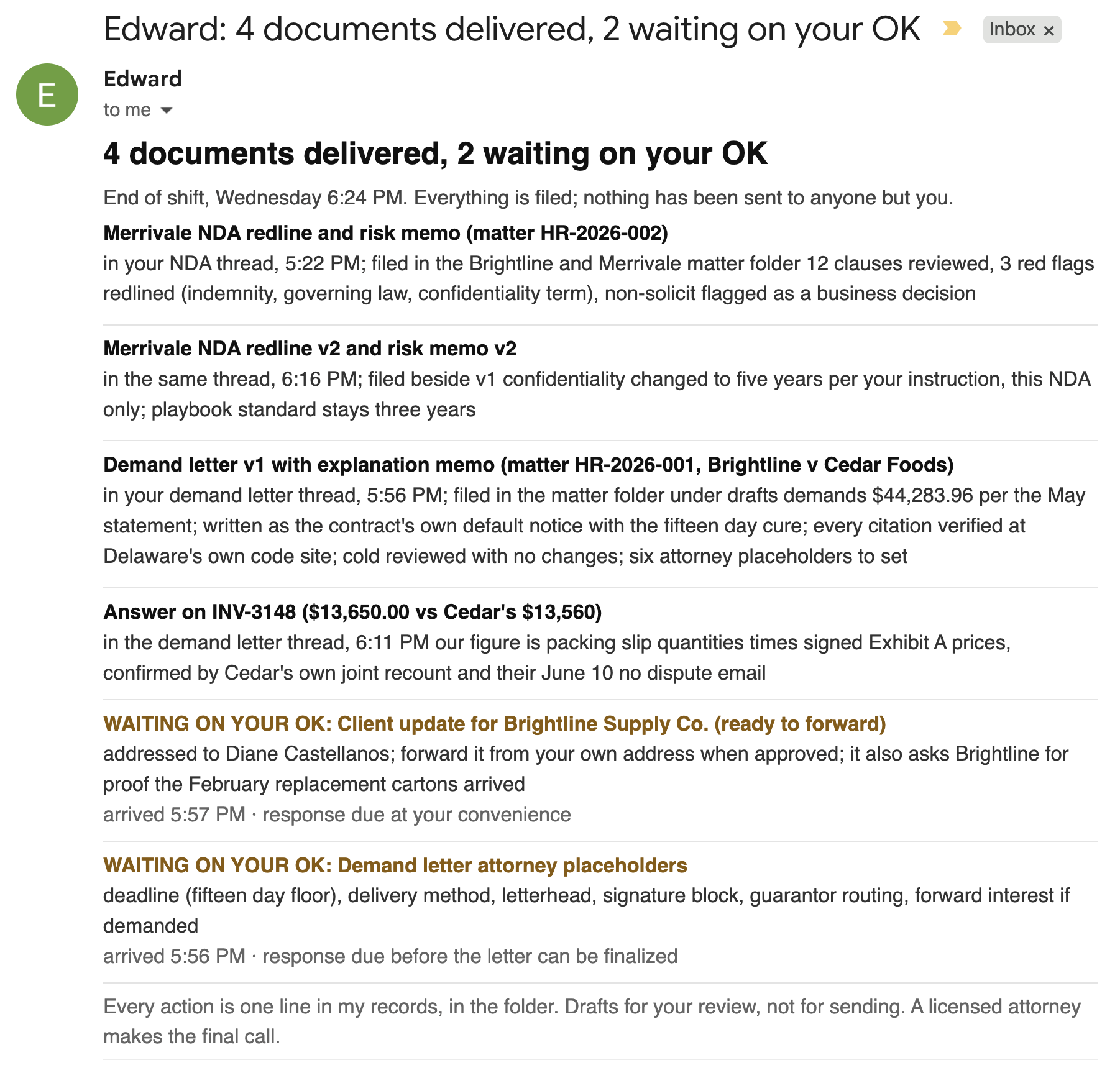
A small firm’s drafting week is contract redlines, demand letters, client updates, all competing with the caseload for the same hours. This page documents the recorded build that hires an employee for that work. Edward is an AI employee who lives in one downloaded folder, runs in the Claude desktop app, and works for the whole firm through email. One person sets him up once; after that, a lawyer forwards him a contract and gets the redline back in the same thread.
His whole job is one loop, the same four moves on every request:
- A lawyer emails him the task.
- He reads the firm’s relevant files in the employee folder, where his knowledge, his memory, and his instructions live as plain files.
- He drafts the documents, updating those files as he works.
- He delivers the finished work in your inbox, and only ever your inbox.
It is still your work at every step: review-ready, never send-ready. A licensed attorney approves everything before it leaves the firm. Everything below is the run as it was recorded, screen by screen, on a synthetic firm: fake clients, real workflows.
Step 1: Hire Edward
The hire is a download, an app, and one typed greeting; his own interview does the rest.
-
Download the employee folder
The free download sits in the panel at the end of this page. Unzip it and drop it anywhere on your computer: one folder named Edward, holding his instructions, his four skills, his pre-filled playbook, and his office folders, all as plain files you can open and read.
Result: The Edward folder sits on your computer.
-
Open the Claude desktop app
The app is a free download; the official page is claude.com/download. The folder costs nothing, and the app runs on a paid Claude plan, Pro or Max in the recorded build. The work happens in the tab called "Code", and no code gets written or read there at any point.
Result: The "Code" tab is open.
-
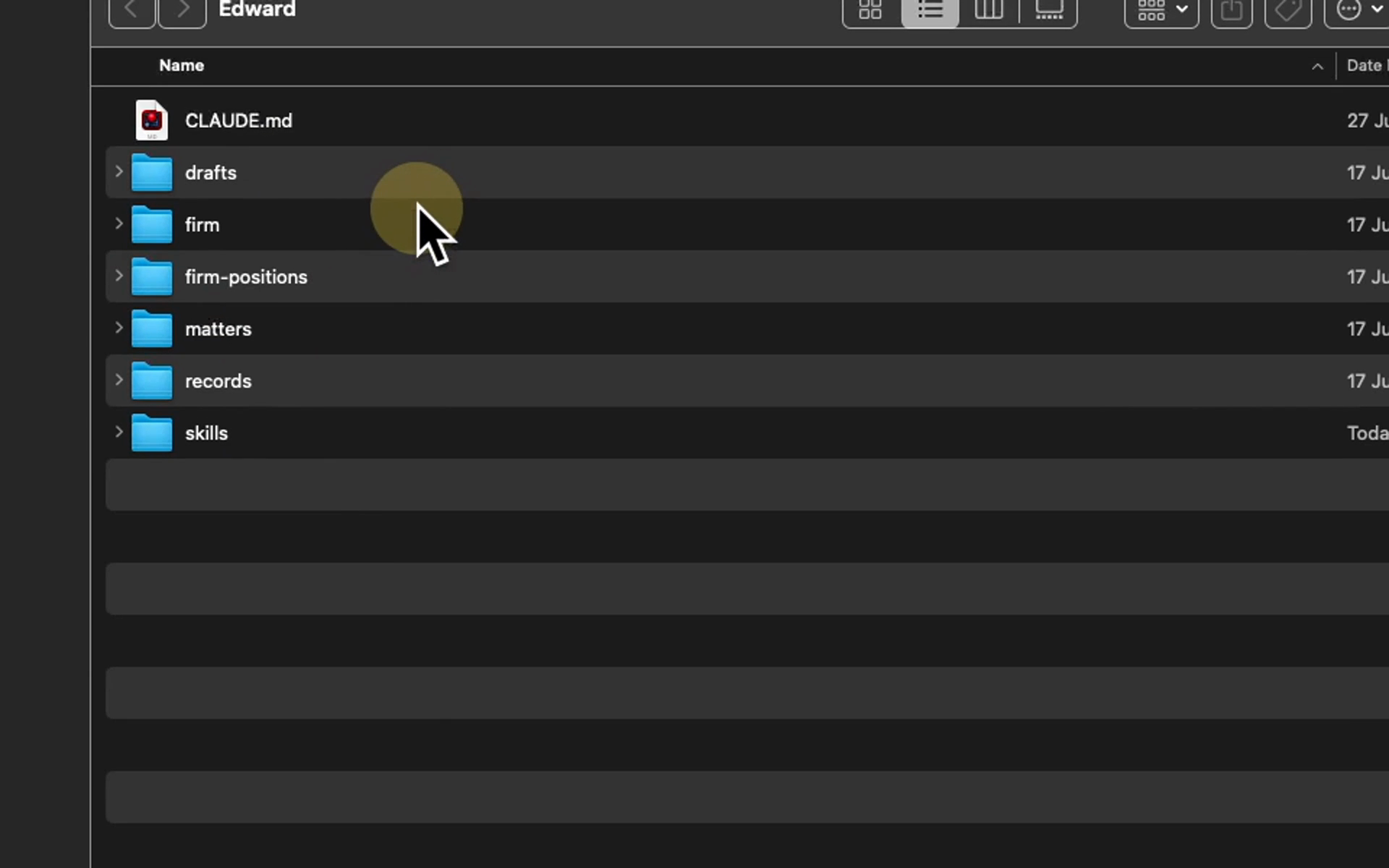
Look at what you downloaded
Six folders, each with a plain title. matters holds your client files as the firm keeps them. firm-positions holds the terms you insist on, written down once. firm is what he learns about your firm when he interviews you. skills are your firm's processes in plain text files he can run. drafts is where work waits for a lawyer, and records keeps one line per action.
Result: You can read everything that makes him the employee.
-
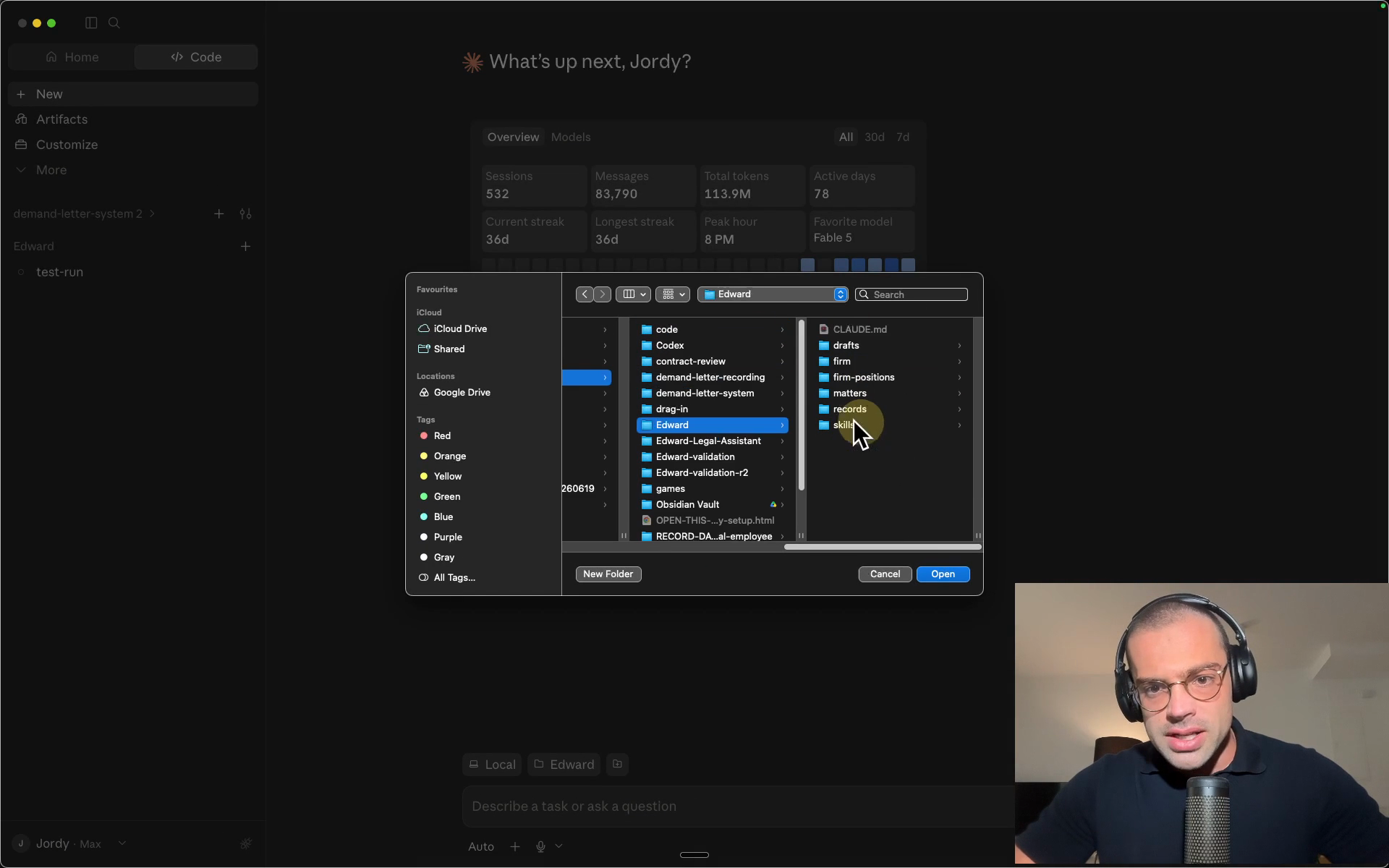
Choose the Edward folder
Pick the unzipped Edward folder. Once chosen, the app's file view shows his files beside the chat.
In the app: "Code" → "Local" → "Select folder"
Result: Edward's folder is the working folder.
-
Type hi
That is the entire hire. The folder ships with his instructions, so he already knows what to do: he reads them, introduces himself, and starts the interview.
Result: Edward is hired and asking his first question.
hi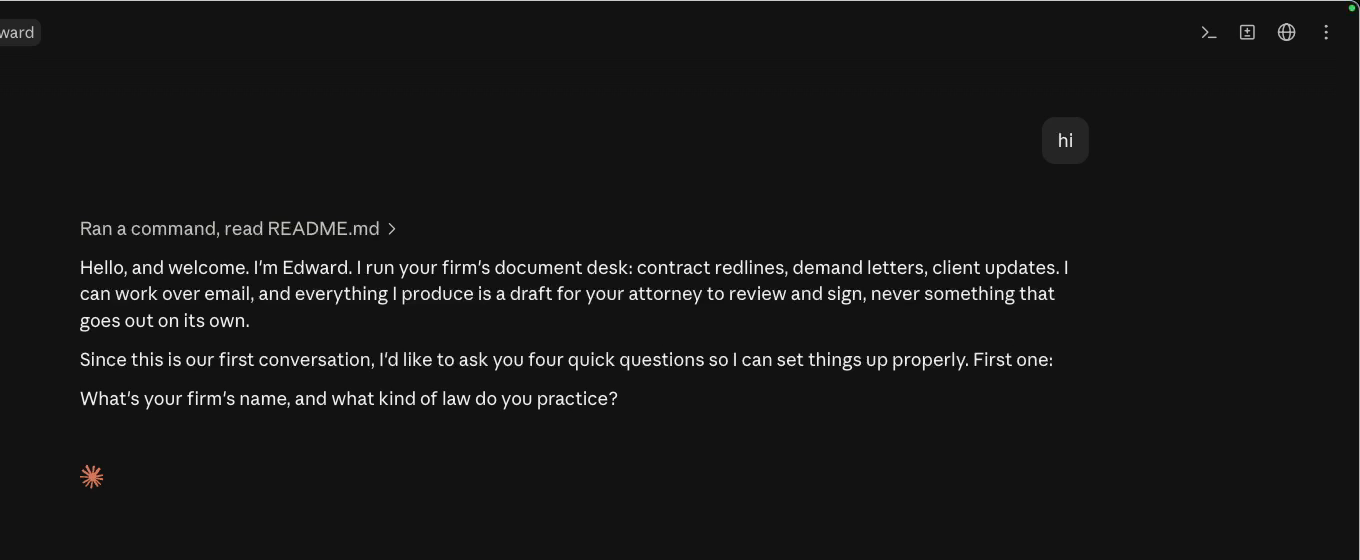
Before his first question is even answered, the boundary is already stated in his introduction: everything he produces is a draft for your attorney to review and sign, never something that goes out on its own.
Step 2: The interview
Four questions, one at a time: your firm, your playbook, the delivery, and his name. For every answer, he updates his files as you watch.
-
Answer the firm question
His first question is the firm's name and practice. The recorded answer is one line: "Hollis and Reyes LLP. Commercial work, contracts and disputes. Houston, Texas." Answer however fits your practice; plain sentences are enough.
Result: He confirms your work is what he is built for.
-
Change what differs in the playbook
The playbook arrives pre-filled with standard contract positions, and he asks one thing: does your firm do anything differently? Name your changes in plain words. If your positions already live in a document, drop that file into firm-positions instead and he reads it there.
Result: Your answers go into the positions file, and what already matched stays.
-
Pick the delivery
He can file finished work in the folder or deliver it by email. The build picks email, which step 4 sets up. He states the condition himself, unprompted: mail only moves while the app is open.
Result: Delivery is set, with its condition said out loud.
-
Keep his name, or change it
The last question is whether the name Edward works for you. The recorded answer: "no its fine". The whole interview runs about two minutes.
Result: The interview ends and he writes the firm's files.
Three things. Indemnity has to run both ways, and we cap it at one times the value of the deal. Three years on confidentiality is right. And use Delaware on our client Brightline's paper, it matches their master agreement.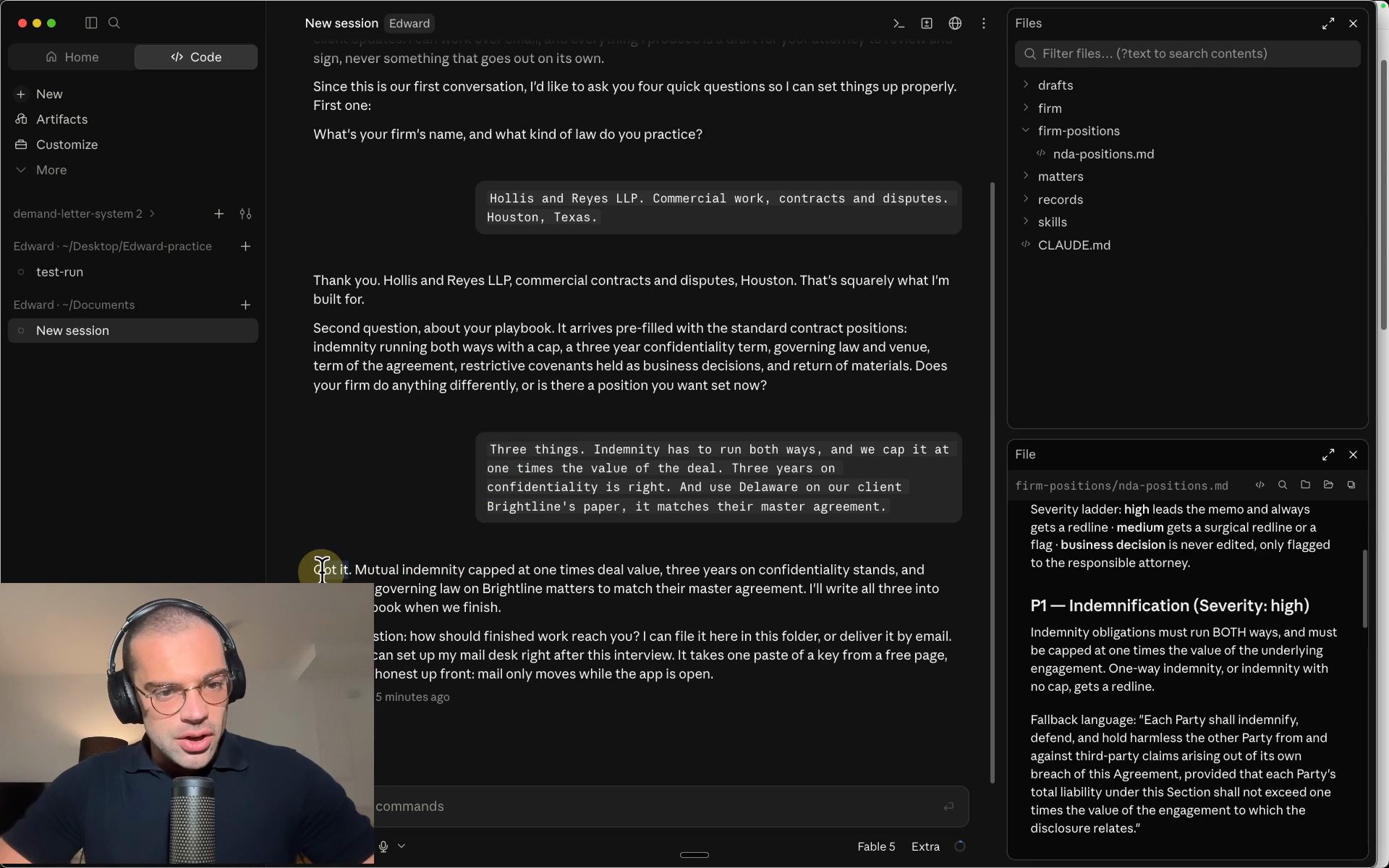
The playbook is the file that puts later drafts on the firm’s terms instead of generic best practice. Every redline in step 5 traces back to a line in it, and the interview is how those lines become yours.
Step 3: Hand him the matter
Edward wants his email desk next; the recording gives him a full matter first, so he has something to work on. This step is one drag and one sentence.
-
Drag the client's folder into matters
The recorded matter is Brightline, a supply company chasing a customer, Cedar Foods, over unpaid invoices: contracts, invoices, statements, email threads, fifty documents in total, exactly as the client handed them over. A Clio export, or an export from any practice management system, drops in the same way.
Result: The matter sits inside Edward's folder.
-
Type the one sentence
The whole instruction is the copy block below: organize it into a proper matter and read it back with the numbers. He plans the work on screen and reads every document, every page, with a team of parallel readers.
Result: The matter comes back organized, registered as HR-2026-001, and read back to the cent.
-
Read the soft spots
Under the numbers he lists what a lawyer should look at before anyone asks. The recording flags three, including a ninety dollar discrepancy on one invoice that was never reconciled, with the documents supporting the client's figure.
Result: The judgment calls are on the table before any drafting starts.
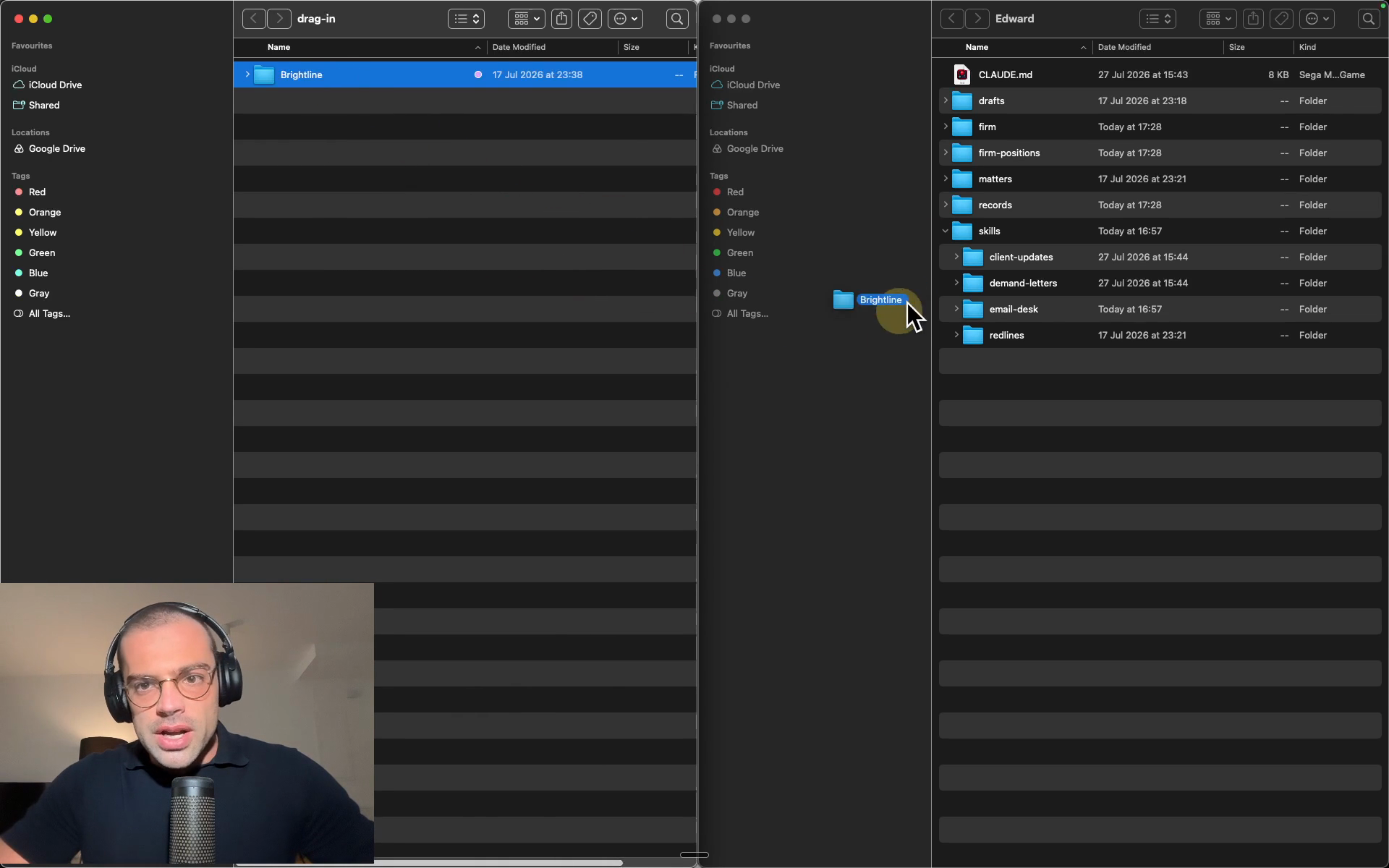
I just dropped our client Brightline's folder into matters, exactly as they handed it to us. Organize it into a proper matter and read it back to me with the numbers.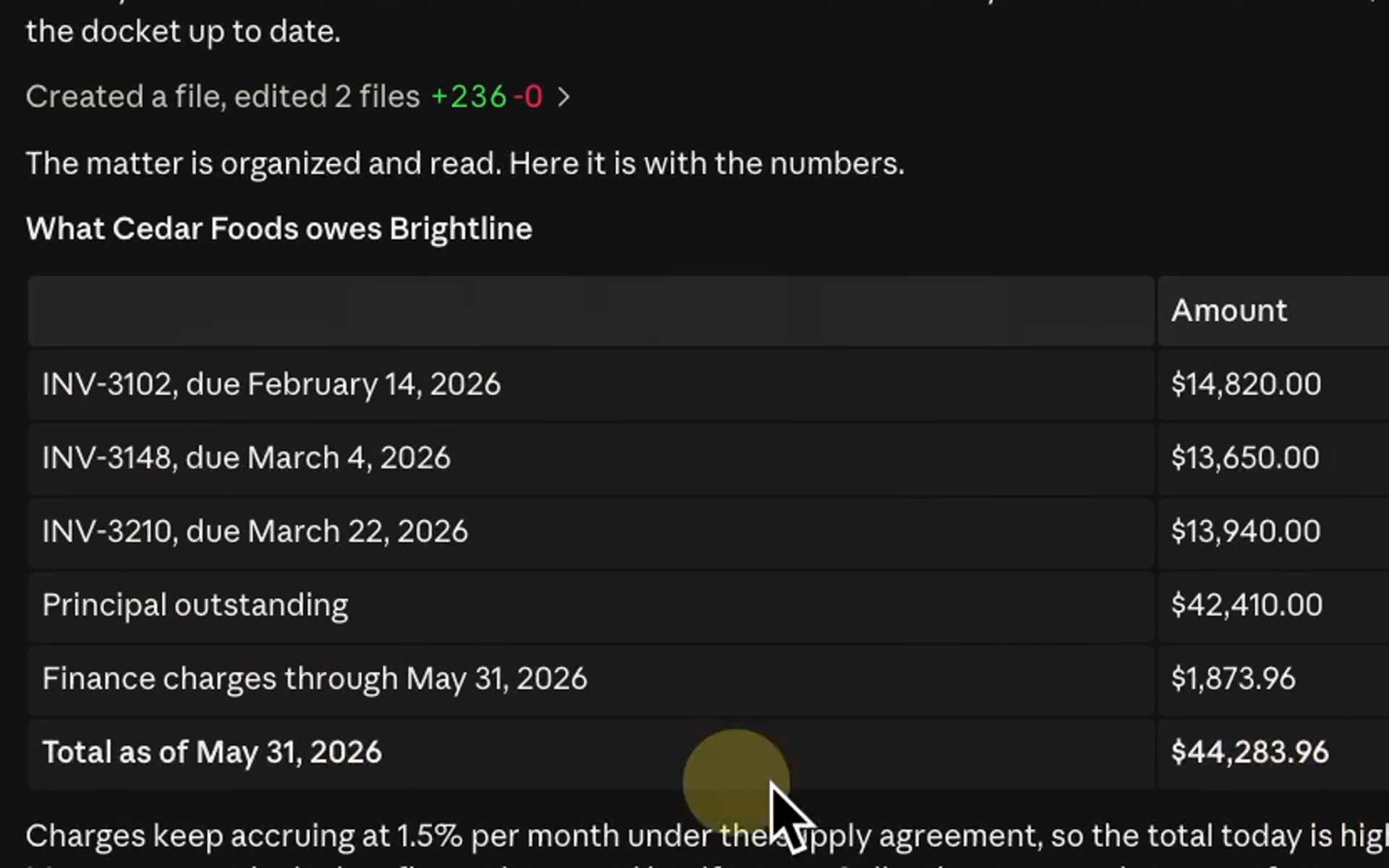
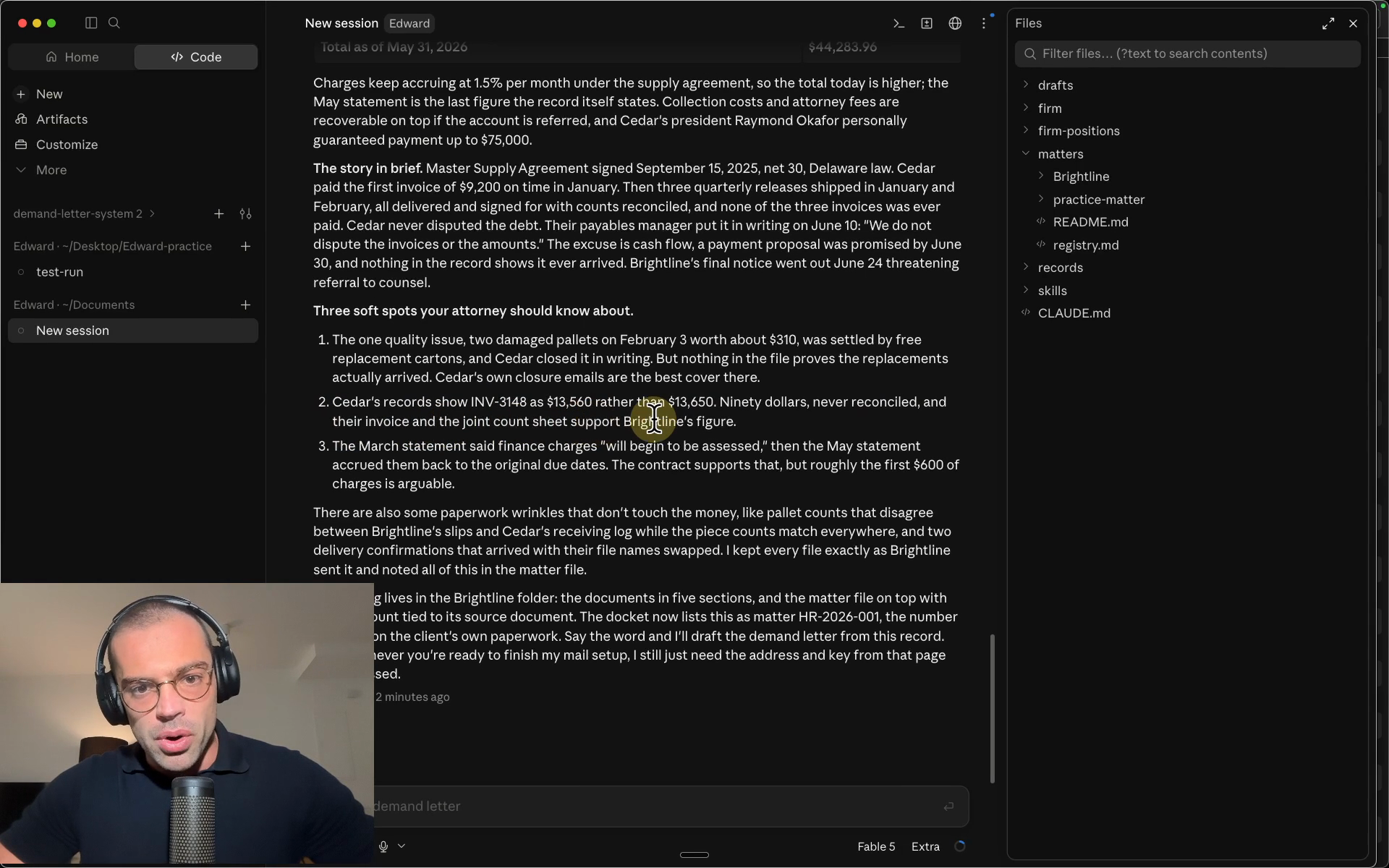
The flag on INV-3148 is worth remembering. It returns in step 6, when the demand letter demands the higher number and a reply asks Edward to defend it.
Step 4: Set up his email address
His address runs on AgentMail, a hosted inbox service for AI agents. Creating the address takes about a minute, and Edward sets up the desk himself.
-
Create his address on AgentMail
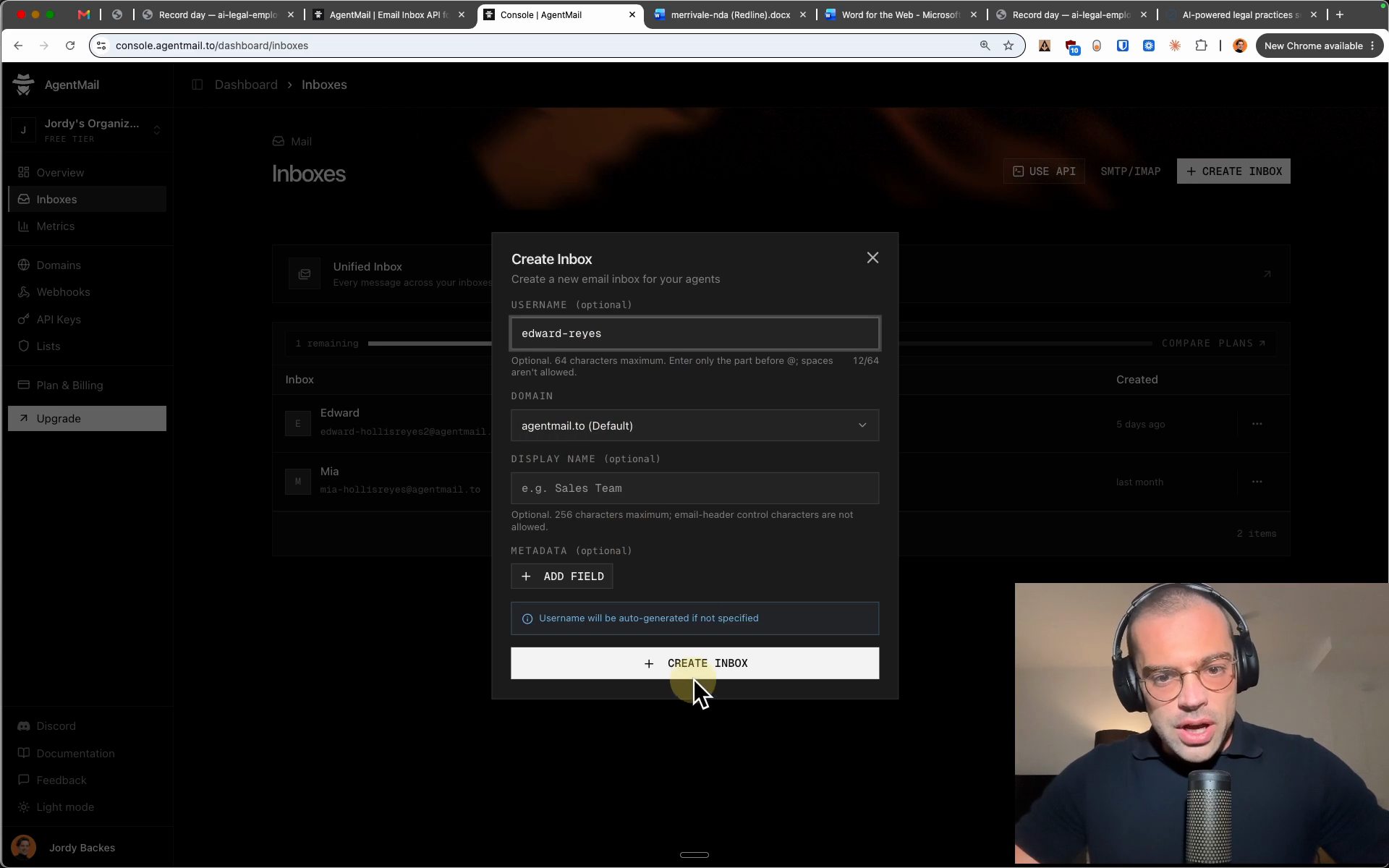
AgentMail is a hosted inbox service for AI agents, free to get started on the recorded build's plan. In the console: "Inboxes", then "+ CREATE INBOX", type a username for your firm (the recording types "edward-reyes"), and create it. That name is Edward's email address.
Result: Edward has an address of his own.
-
Create one API key
Under "API Keys", create a key and copy it; the console shows it a single time. The key works like a password for Edward's own inbox and nothing else. Treat it like any key: share it with no one, and revoke it in the same console the moment you want it gone.
Result: You hold the address and the key, the only two things the desk needs.
-
Paste both to Edward in the chat
He asked for exactly these two during the interview. Notice what you are not handing over: no login for the firm's own mailbox exists anywhere in his folder, so Edward cannot get into your email at all. He writes his own mail settings, names the inbox so his mail arrives as Edward, and sends a self test to the firm's address.
Result: The desk is up, and his test note is in your inbox.
-
Put him on watch
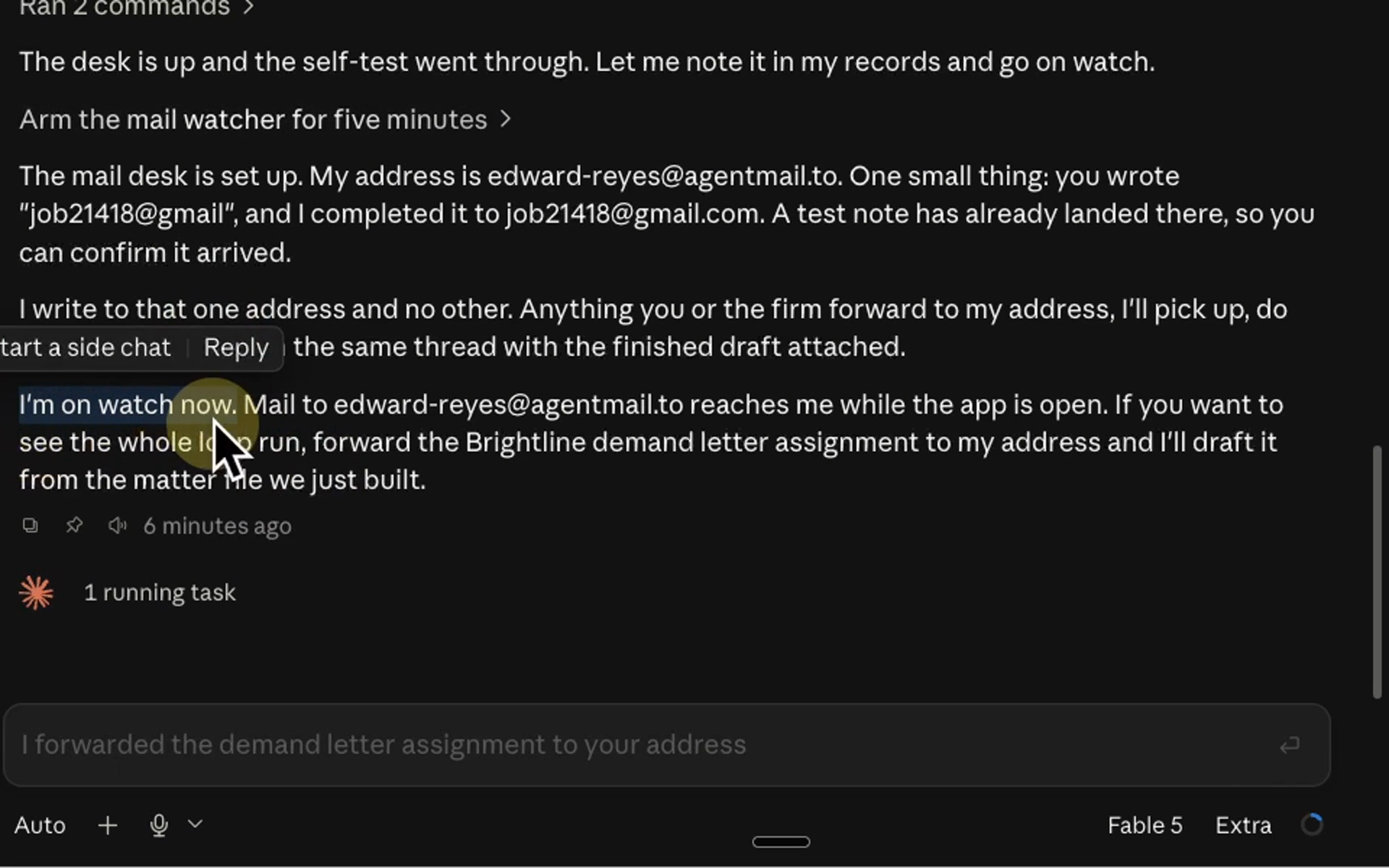
One typed line starts the watching, and its mirror, stop watching the email, ends it. On watch he checks his own address about every twenty seconds, for as long as the app stays open. After a restart, one start watching your email puts him back on duty.
Result: Mail to his address gets picked up while the app is open.
-
Prove it from your own inbox
The recording is in Gmail; Outlook or any other provider works the same way. Write to his address, ask for a test reply, and watch it land in the same thread. From here on the app stays open in the background, and the work moves to email.
Result: The loop is proven both ways, in your own mail.
start watching your emailWrite us a test email back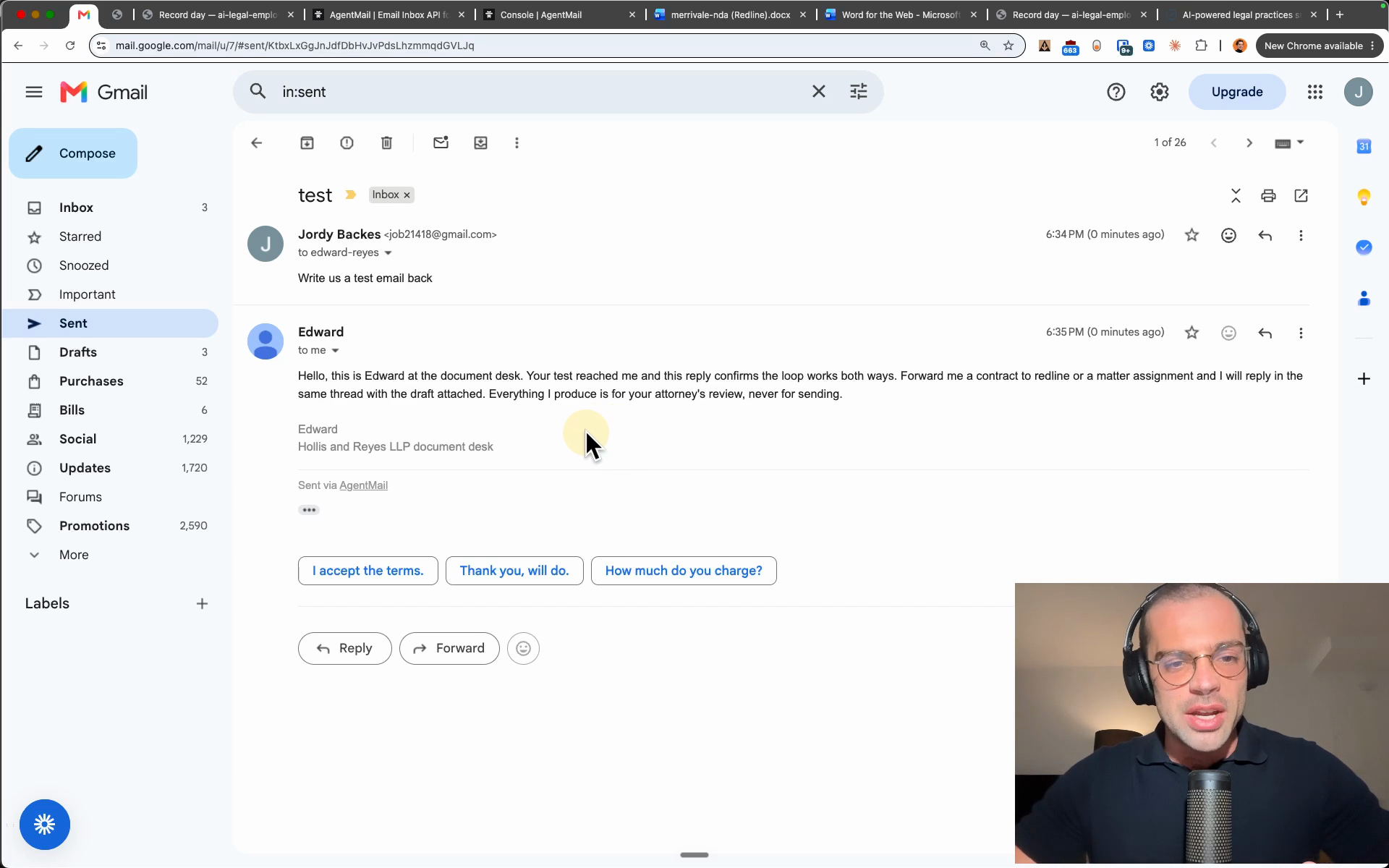
Edward can send mail to the firm addresses you configured and to nobody else: he drafts, you send. And the same missing login that keeps him out of your mailbox means he can never leave drafts inside it.
Step 5: Email him a contract, get the redline
The first job, end to end, from the inbox: a counterparty NDA in, a redlined Word document back in the same thread.
-
Forward the contract with one line
Merrivale, the counterparty on one of Brightline's deals, sent over their NDA to sign. Forward it to Edward's address with the one line ask in the copy block below. That is the entire handoff.
Result: The assignment is in his inbox.
-
Look over his shoulder while he works
Back in the app, the mail arrives, gets filed to its own matter, and the review starts on the redline skill. A skill is one of your firm's processes written down once, in plain English, in a text file; the four in the folder's skills directory show the shape.
Result: You watch the process run; there is nothing for you to do.
-
Open the reply
It arrives in the same thread about four minutes later with two files: the risk memo, and the redlined Word document. His mail leads with the totals: 12 clauses reviewed, 3 red flags redlined, and the Section 9 non-solicit flagged as a business decision, not edited.
Result: Tracked changes wait in Word, ready to accept or reject.
-
Check the edits against your positions
Open the positions file beside the document. The mutual cap the interview set is in Section 8 almost word for word, and the governing law clause now reads Delaware. What he refused to edit matters as much: Section 9 carries no mark, because the playbook holds restrictive covenants as business decisions.
Result: Each edit traces to a position the firm wrote; the judgment call stays flagged.
Edward, please redline this NDA against our firm's positions.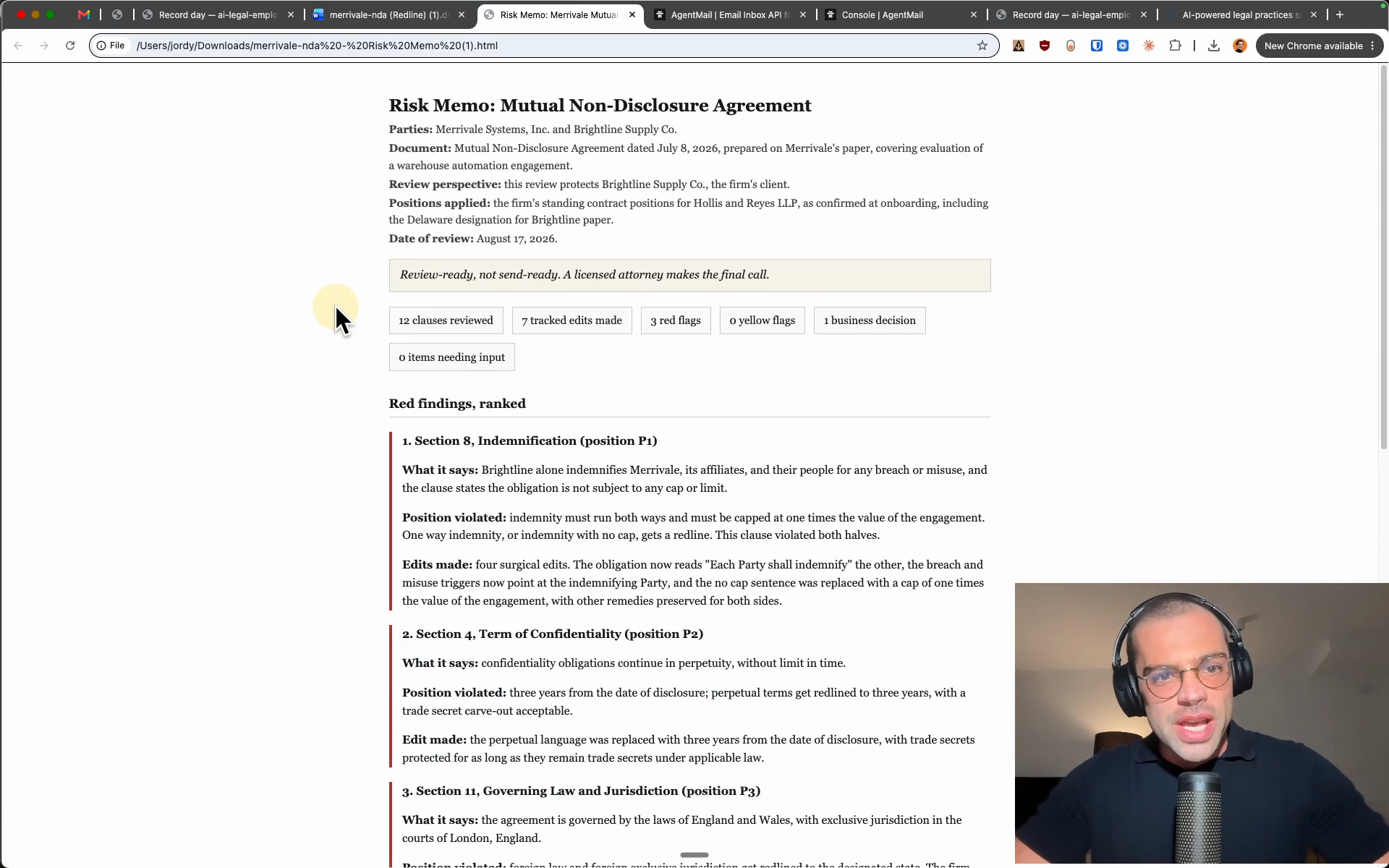
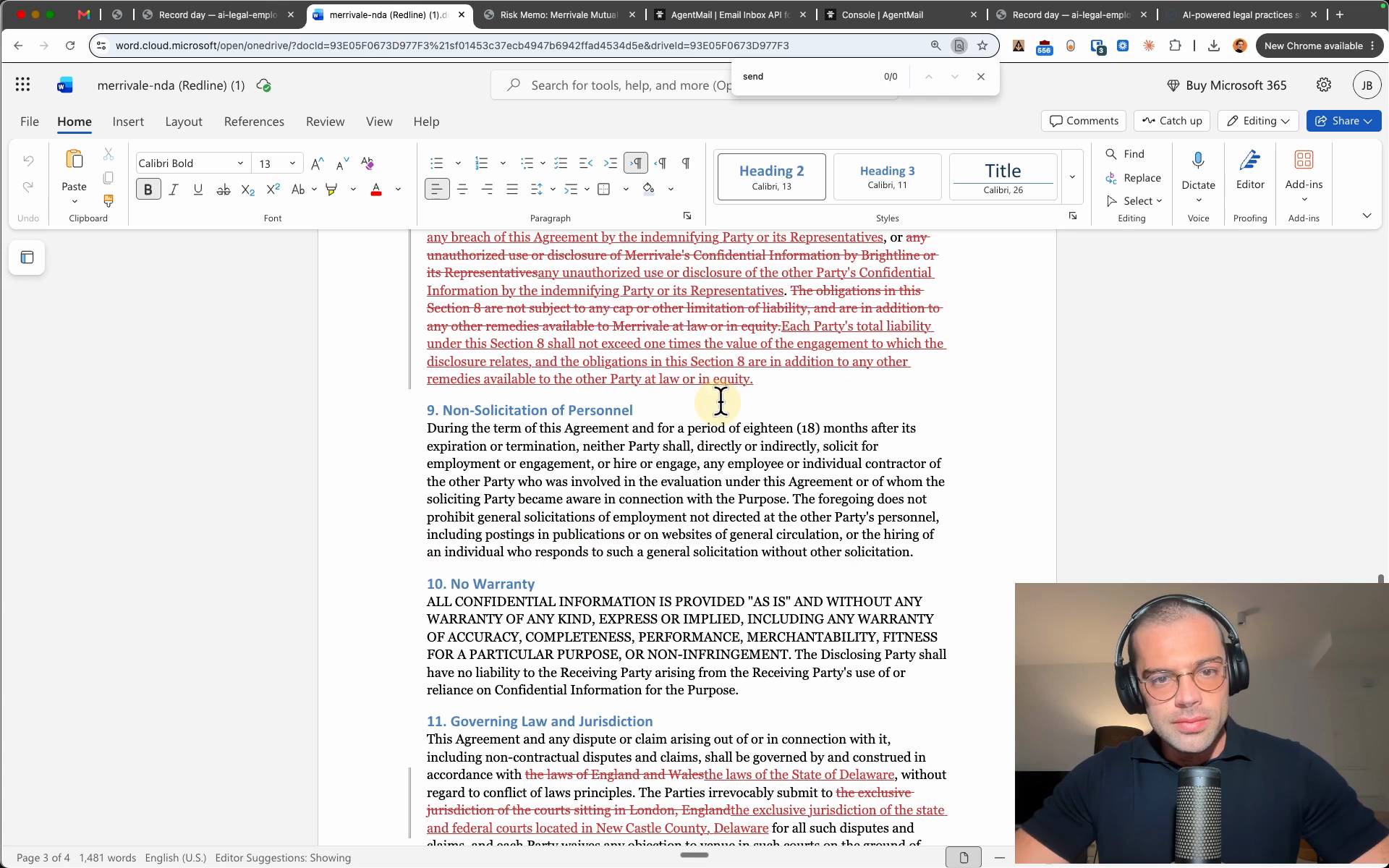
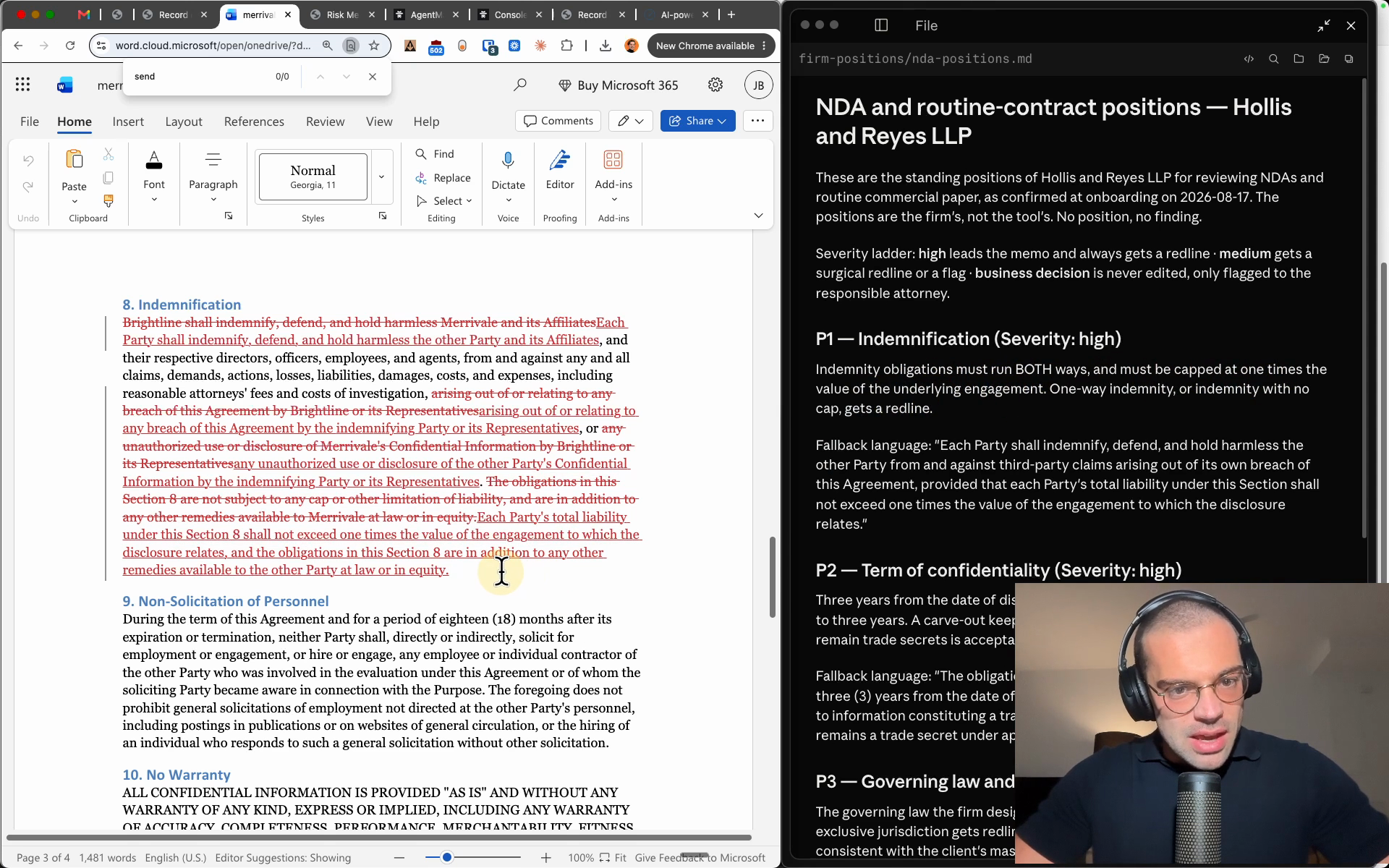
What comes back is a document a lawyer can accept, reject, and sign off on, plus a memo a partner can read cold. Where the playbook says business decision, he flags it and leaves the judgment with the firm.
Step 6: The demand letter, from all fifty documents
The redline was one document. The demand letter is drafted from the whole record, and the client update rides along with it.
-
Assign the letter by email
A new mail to Edward's address, three short sentences: the copy block below. Add whatever your professional experience would tell an associate; in the recording, the tone ask came back honored.
Result: The job runs unattended while you work.
-
Read what ran while it drafted
His research verified every statute the letter leans on, word for word, at the state's own statutes site, and one candidate authority that did not cleanly hold up was left out. A second team took Cedar's side like opposing counsel, and a fresh reviewer read the finished letter cold and caught four real problems, so the delivered version is already the corrected second one.
Result: The letter arrives about half an hour later, reviewed before you ever see it.
-
Open the reply and the letter
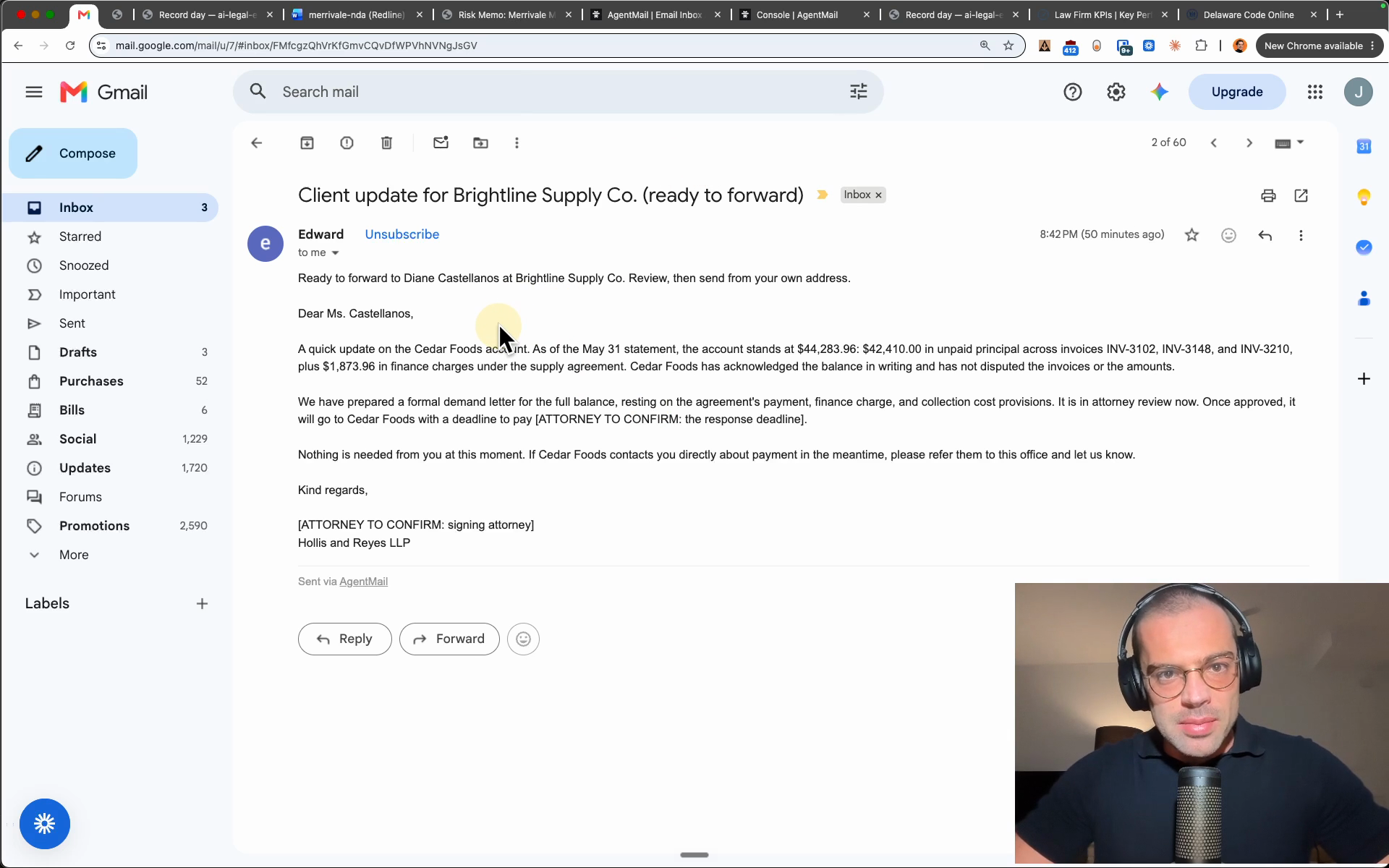
The mail body is the explanation memo: every claim in the letter, point by point, each naming the matter files behind it. The letter demands the exact balance from step 3, $44,283.96 as of May 31, and where a number needs a lawyer it carries a bracketed placeholder instead of a guess: the forward interest, the deadline, the signing attorney.
Result: You can check any claim in one click before it goes anywhere.
-
Check one citation yourself
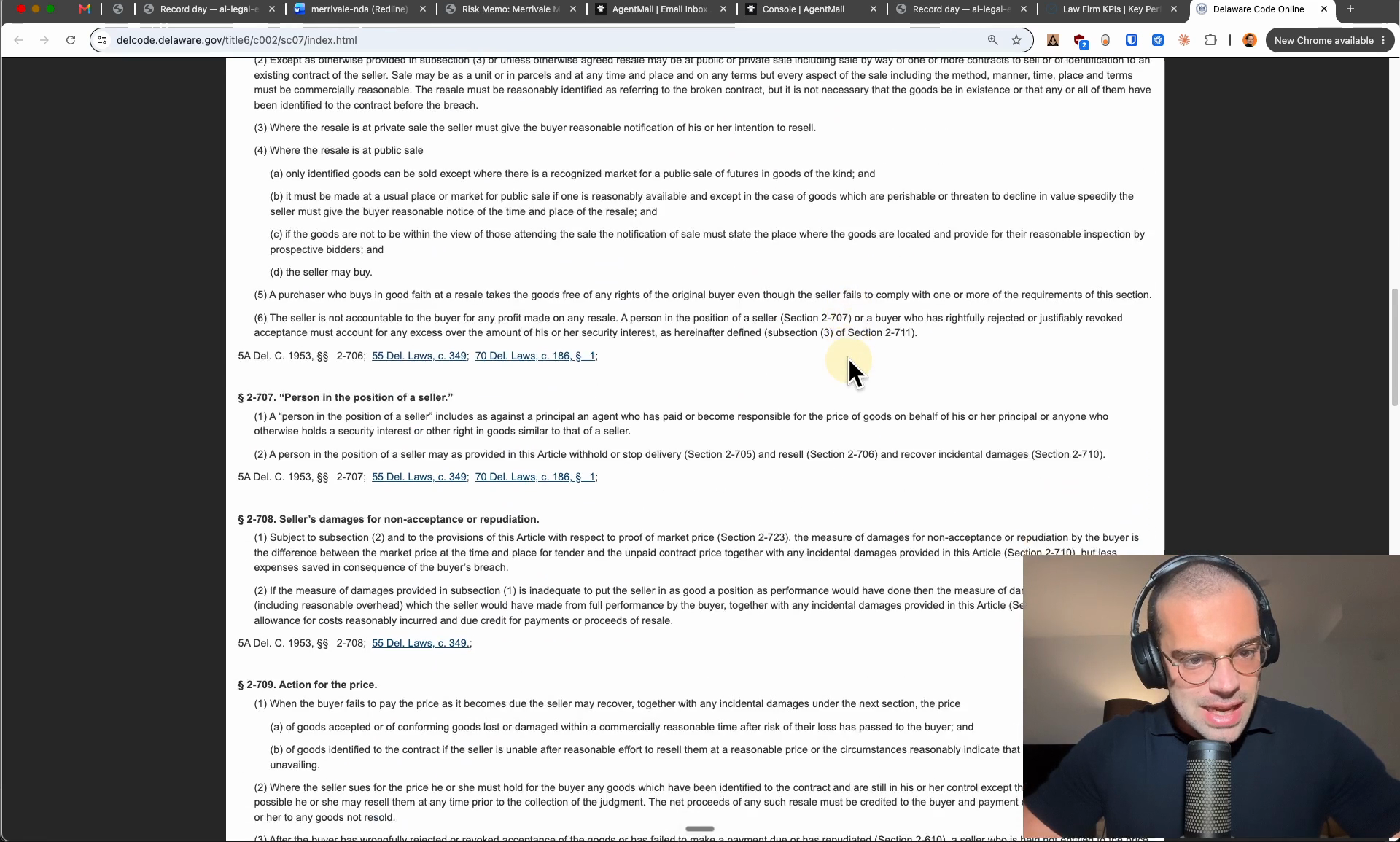
The research file in the matter folder keeps every verified link. Take the link for section 2-709 and the browser opens the official Delaware Code page: the exact section, on the state's own site.
Result: The verification trail holds up outside Edward's own word.
-
Question his numbers
The ninety dollar gap from step 3, Cedar's $13,560 against the letter's $13,650, is exactly what a client could ask about, and the letter demands the higher figure. Reply in the letter's thread with the question in the copy block below; his answer names a file for every claim it makes.
Result: The number is defended from the record, four ways, in about a minute.
-
Forward the client update
A separate mail arrived with the letter: the update for the client, addressed to Brightline's contact and ready to forward. Edward cannot send it; he can mail nobody but your firm. You read it, fill the bracketed attorney items, and the OK is the forward itself, from your own address.
Result: The client hears from the firm, and every word passed a lawyer first.
Draft the demand letter for the Brightline matter. Demand the full outstanding balance as of the May statement. And keep the tone measured.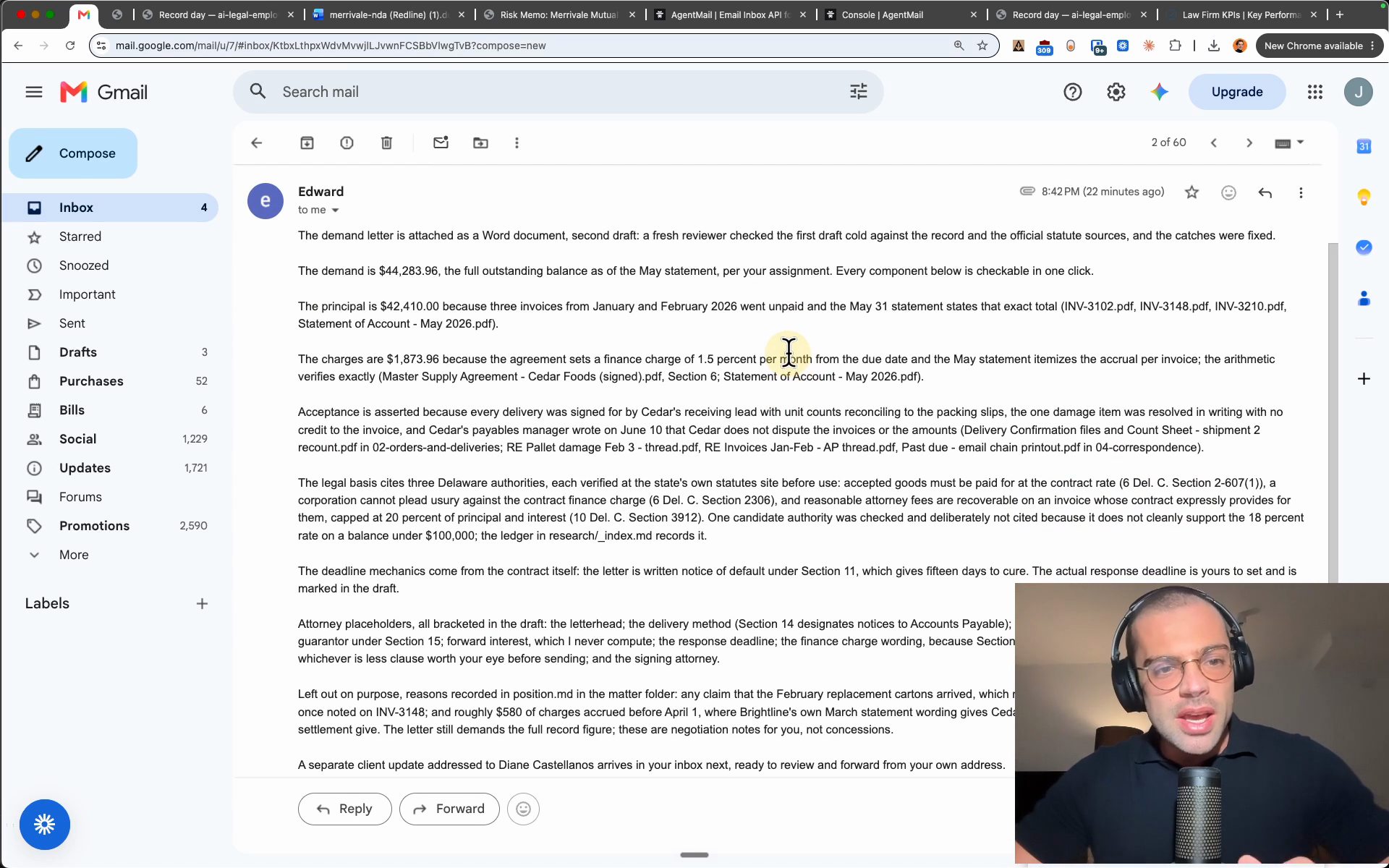
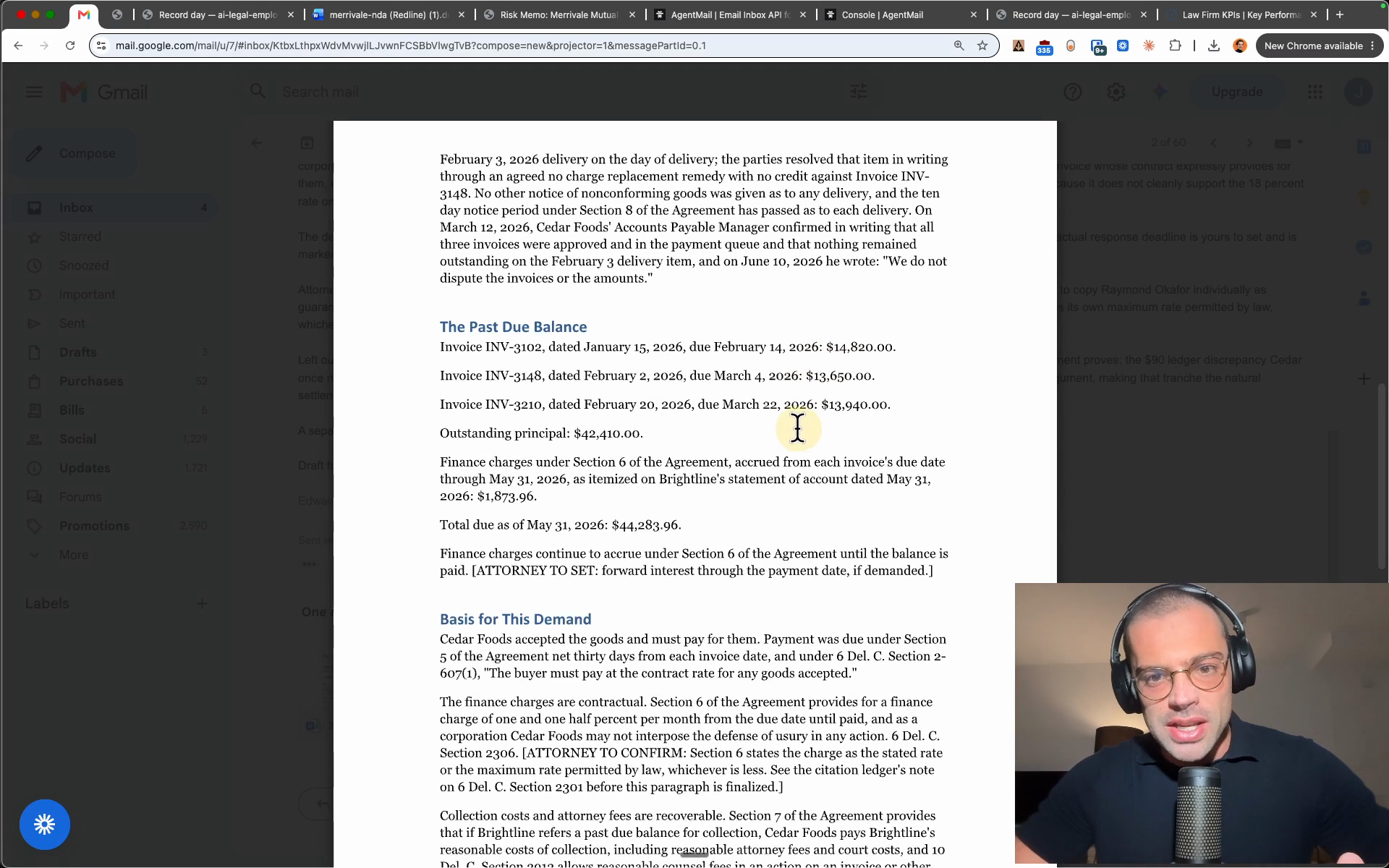
Cedar's own system shows Inv-3148 at 13,560, but your letter demands 13,650 for that invoice. Why should our number win over theirs, and what do we point at if they push back?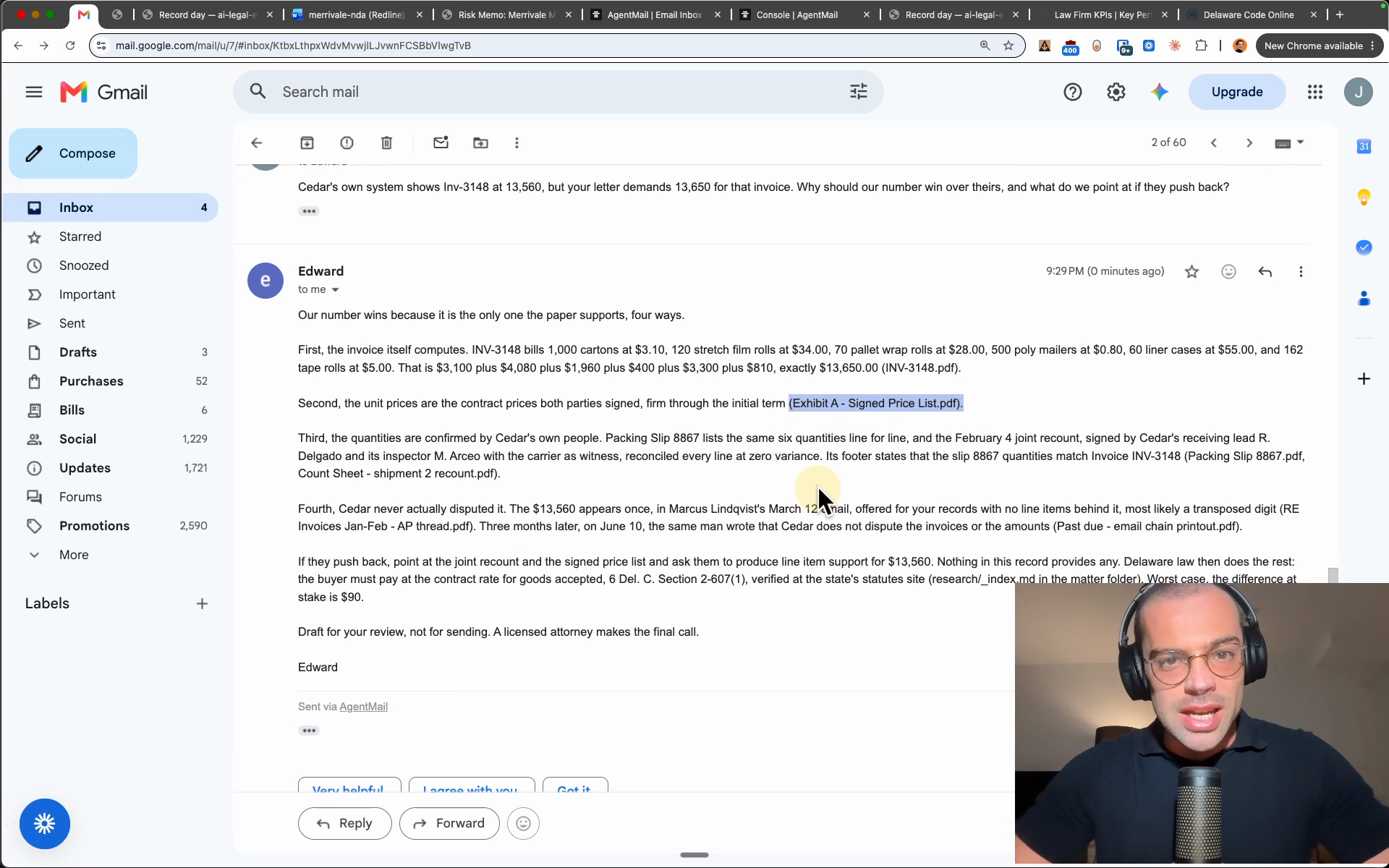
Your part in the whole letter job was two emails and one forward, plus the review that stays a lawyer’s. The letter is drafted and explained, the questioned number is defended from the record, and every decision in it is still yours.
Step 7: Correct him by email
The promise from the hire, kept: changing Edward’s work without ever touching the app.
-
Reply with the change
Say the firm wants a longer confidentiality tail on the Merrivale NDA. In the redline thread from step 5, reply with the one line in the copy block below. That is the whole request; the app never gets opened.
Result: The correction is assigned from your inbox.
-
Open the corrected redline
About two minutes later his reply is in the thread with the corrected document attached: five years from disclosure on this NDA only, the trade secret carve-out kept, every other change standing. His mail states the part that matters for the firm: the playbook keeps three years as the standard, because one client's exception is not a new firm position.
Result: The document changed; the playbook did not.
-
Read the records
The records folder keeps the whole shift, one line per action: every mail in, every reply, every file touched, every flag raised, dated. If anyone ever asks what the AI did on a matter, the answer is on file.
Result: The shift is auditable, line by line.
Edward, make the confidentiality five years for this NDA. Everything else stays.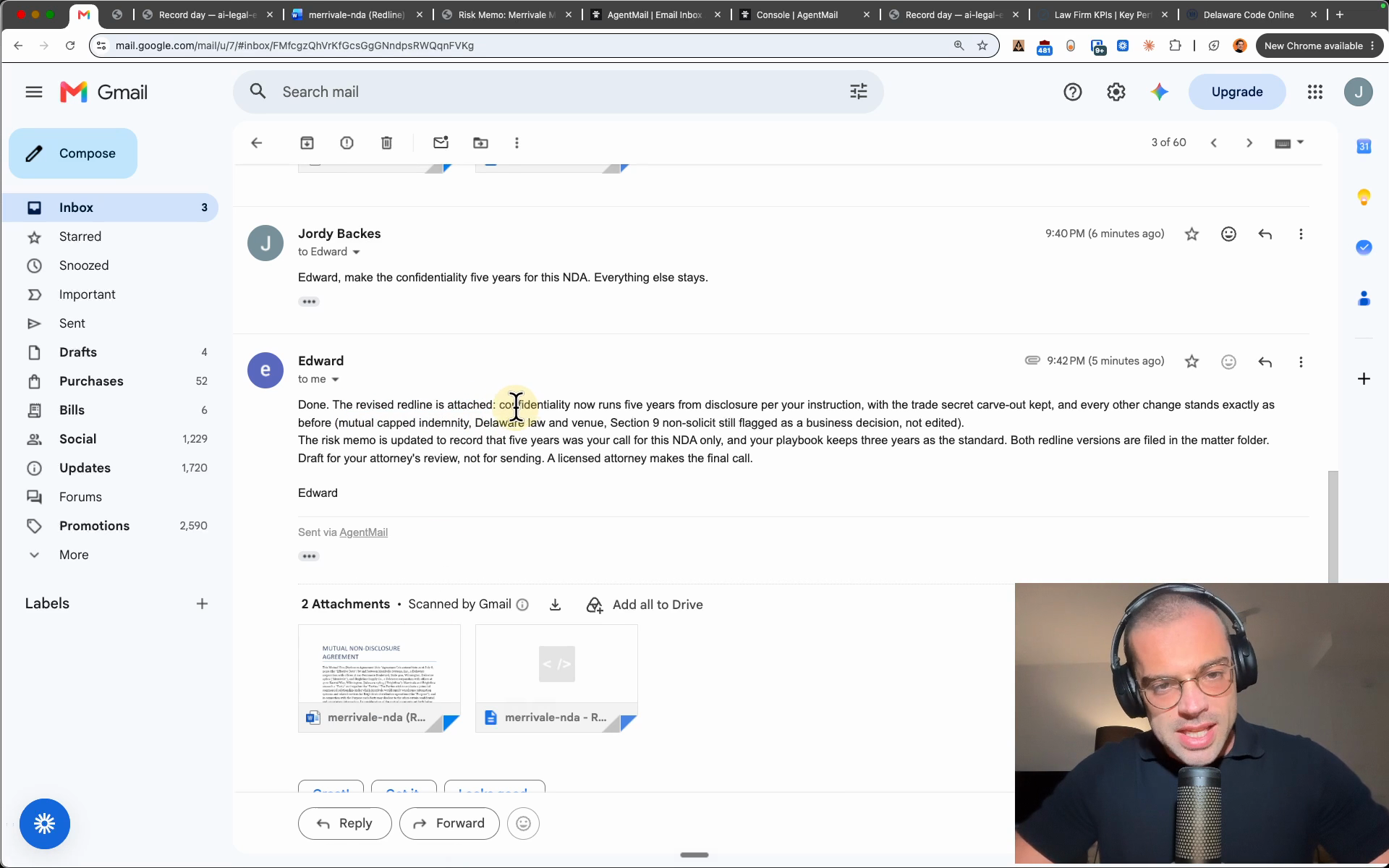
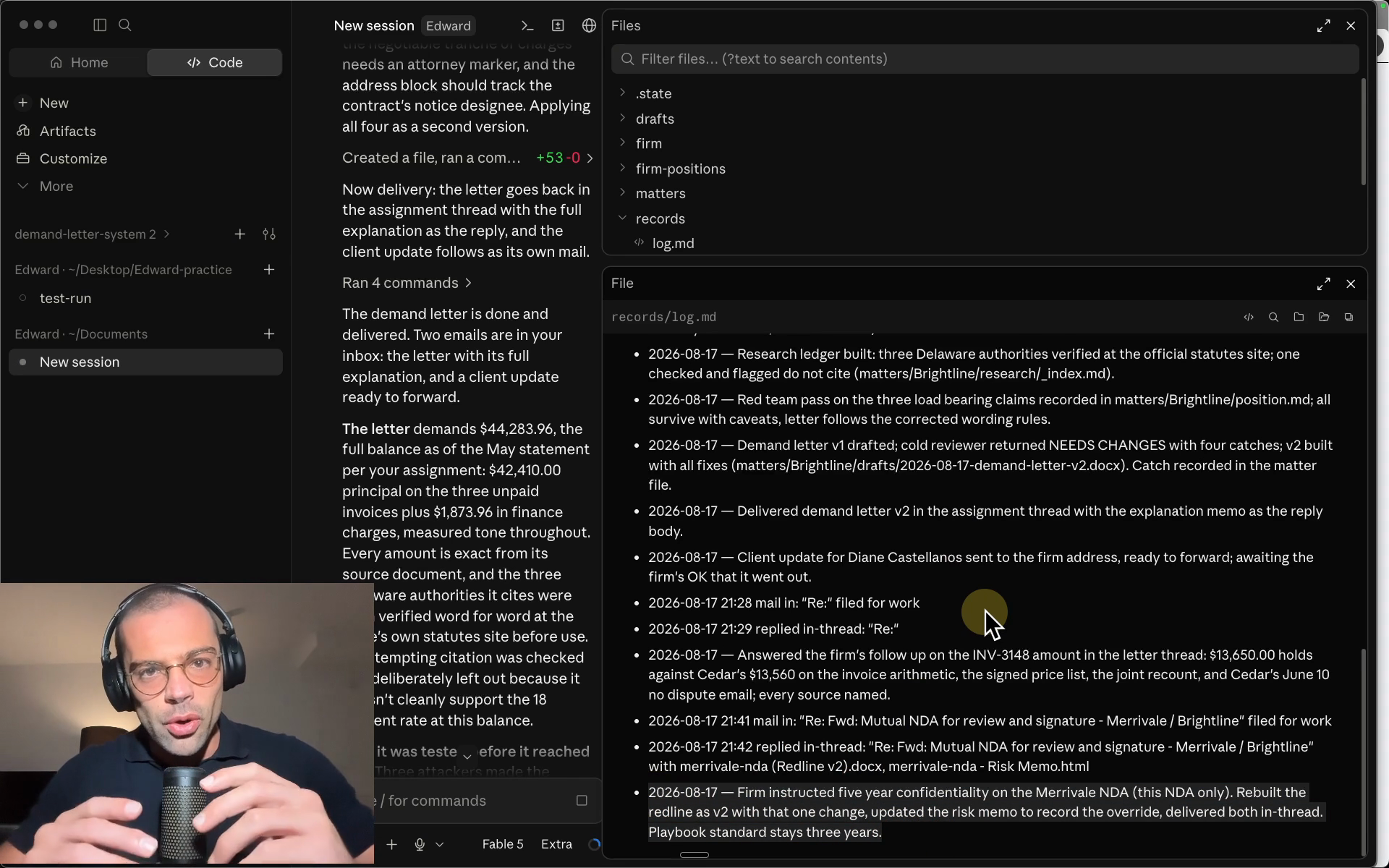
So that is how you work with him: assign by email, receive by email, and send corrections the same way.
Honest limits
In an eight hour day, the average lawyer puts about three hours into billable work, and roughly five hours of every day go to the unbilled rest: the organizing, the client updates, the chasing (Clio’s Legal Trends data). The work you watched Edward do on this page is that kind of work. The honest part comes with it, because Edward has four real limits right now.
- Office hours: he works while the Claude app is open and he is off when it is closed. The contract that arrives at nine PM on Friday waits until Monday.
- Your mailbox: the missing login that keeps him out of your inbox also means he cannot watch it for new work or leave drafts inside it. You forward work in; that deeper wiring is not in this folder.
- Nobody is watching him: if he errors out mid shift, no alert reaches anyone. Once lawyers rely on him, a silent failure at the wrong moment is expensive; a watchdog that alerts you is the setup you would want, and this build does not include one.
- Nobody is maintaining him: your templates change, your skills change, the AI models change, and what you downloaded is what you will still be running unless improving him is someone’s job.
Behind those four sits one more honest gap: the Edward you download is the generic version. He works, but he is not built around your firm, not your practice areas, not your templates, not your systems. Getting him from good to the best version for your firm is real work, and it is exactly the work that needs the one person from the start of this page.
I am not a lawyer; building AI employees for law firms is the work this page comes from. That one person can be me: the managed Edward runs without the four limits, built around your firm specifically, watched twenty four hours a day, and kept current as your firm changes. On a call you watch an employee like this run on your firm’s own work, and yours is live within forty eight hours of kickoff. The card in the panel below is that path; the free folder beside it is exactly the build on this page and the honest place to start.