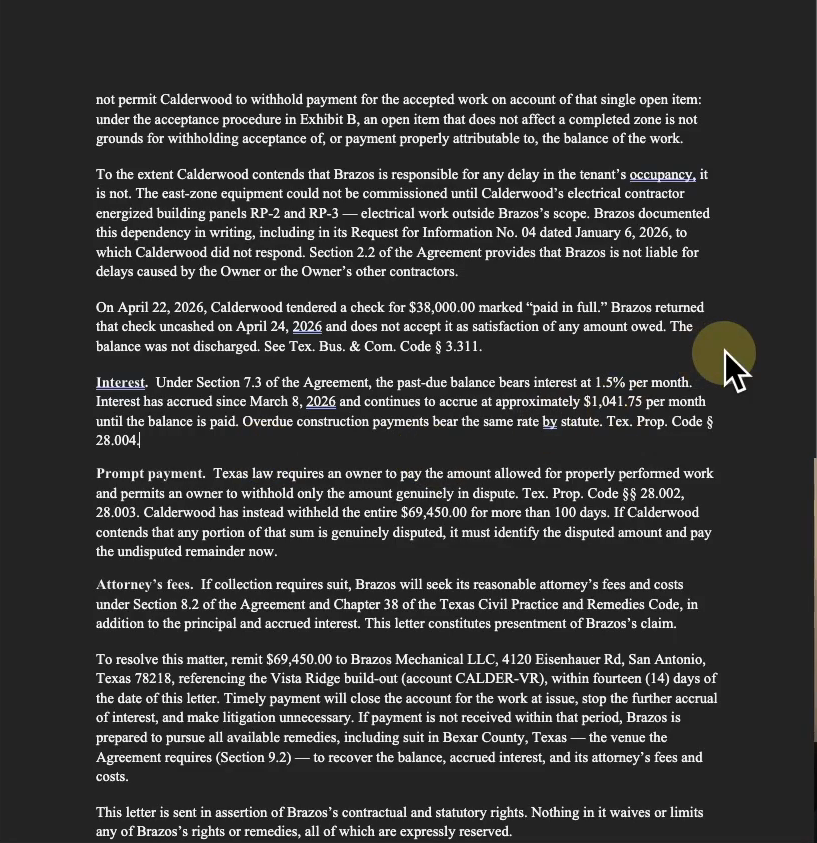
Demand letters drafted with AI usually share the same two problems: some arguments are weaker than they look, and some citations point to cases that do not exist. That is what one agent working alone tends to produce, because a single pass has nobody checking it. The build on this page takes the other route: it puts 155 agents on one letter, in waves that research the law, build the position, attack it the way opposing counsel would, and fact check the finished draft line by line. A lawyer decides at four fixed stops. Everything below is the run as it was recorded, screen by screen, with the honest limits included.
Step 1: The client matter
You start with exactly what the client handed you. In the recorded build that was 51 documents: the signed contract, the change orders, the invoices, the full email thread, the photos, and the daily logs from the job. Nothing gets renamed or summarized first. Organizing the pile is the system’s job, not yours.
-
Install the Claude desktop app
Search for the Claude download page and install the Mac or Windows app. You need a paid plan, Pro or one of the Max plans. At the top of the app there are three tabs, and this build works in the code tab. You never write any code there. Typing four commands is the whole interface.
Result: The app is open in the code tab.
-
Turn off the model training toggle
In the privacy settings there is a model improvement toggle; in the June recording it reads "Help improve our AI models". With it off, Anthropic states new chats and coding sessions are not used to train its models. Confirm where yours stands before any matter goes in.
In the app: Your name (settings menu) → Settings → Privacy
Result: Training on your chats is off, and you noted the date.
-
Make the project folder and drop the four skills in
One folder named demand-letter-system, with a folder named skills inside it. Both names need to be exact. Drag in the four skill folders: new-matter and build-case, then draft and review. The free download at the bottom of this page is this project folder with the skills already in place.
Result: Four skills installed in the project folder.
-
Add the matter folder with the client documents
Make a folder named matter and drop in everything the client handed you, exactly as it is: the signed contract, the change orders, the invoices, the email thread, the photos, and the daily logs. The recorded run used 51 documents. If your matter lives in Clio or another system, export the files first and drop them in the same way.
Result: The project folder holds the skills and the raw matter.
-
Open the folder in the app and run the first skill
Point the app at the demand-letter-system folder when you start the session, then type the first command below. The files sidebar shows what it builds as it works.
Result: About 12 minutes later, on 51 documents, the matter file exists: the summary, the chronology, our claims, their claims, and the evidence, plus a one-page matter overview.
The first command is the whole instruction. If you open a skill, you find a plain text file: your firm’s process written down once, so it runs the same way on every matter you open.
/new-matter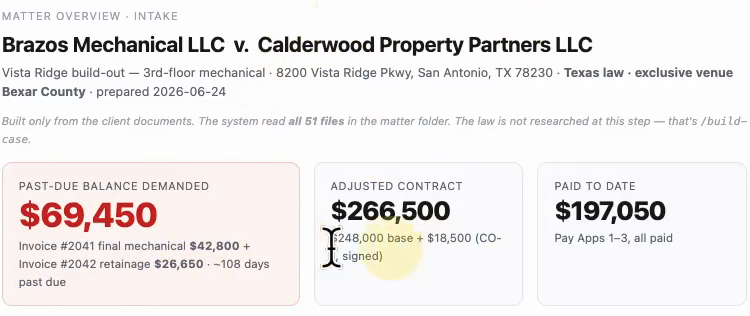
The skill stops at the overview on purpose. This is the first attorney judgment stop: you read the one page, you correct anything that is off by saying so in the chat, and every later step works from your corrected version.
Step 2: Build the case
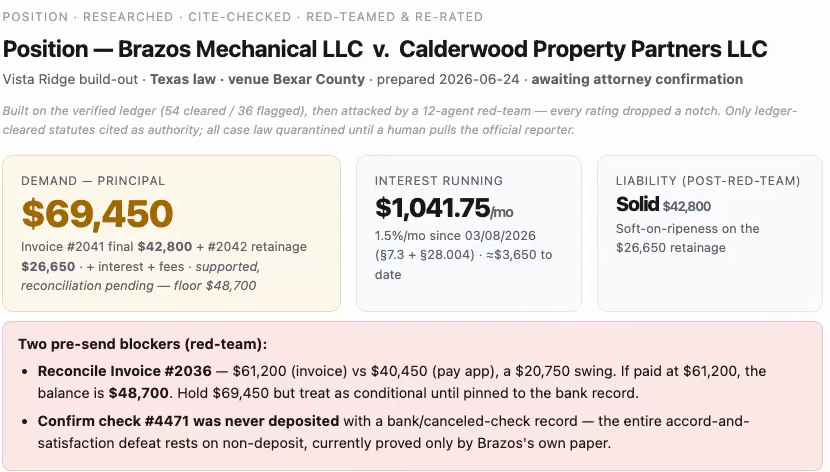
This is the part one agent tends to do badly. The case build runs as three waves: research agents pull the law that fits the matter and file each cite with a link to its official source, a second wave builds the position those files support, and a fresh wave attacks that position like opposing counsel, downgrading whatever the file cannot defend. One agent doing the whole job tends to please you; the attack wave is there to stop that.
/build-case/workflows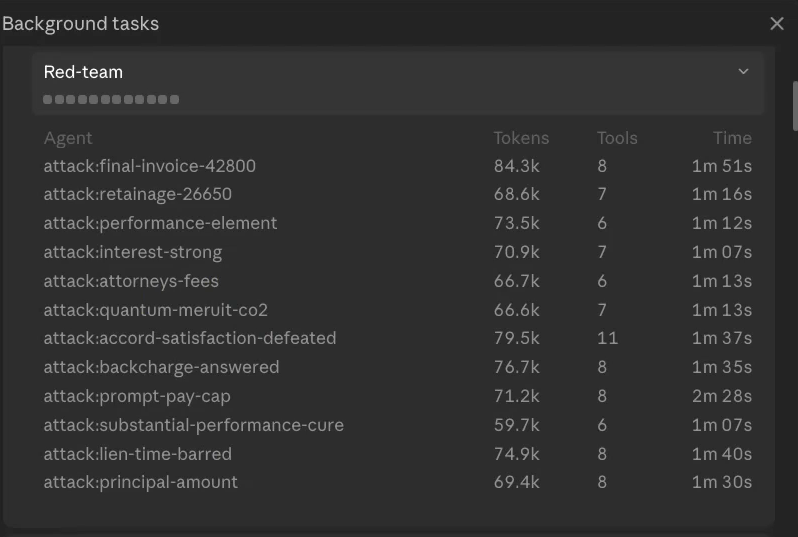
The verification is the point of all this headcount. More than fifty of the wave-one agents did nothing but check citations, and their job was to reject any cite that is off point, does not exist, or lacks an official source.
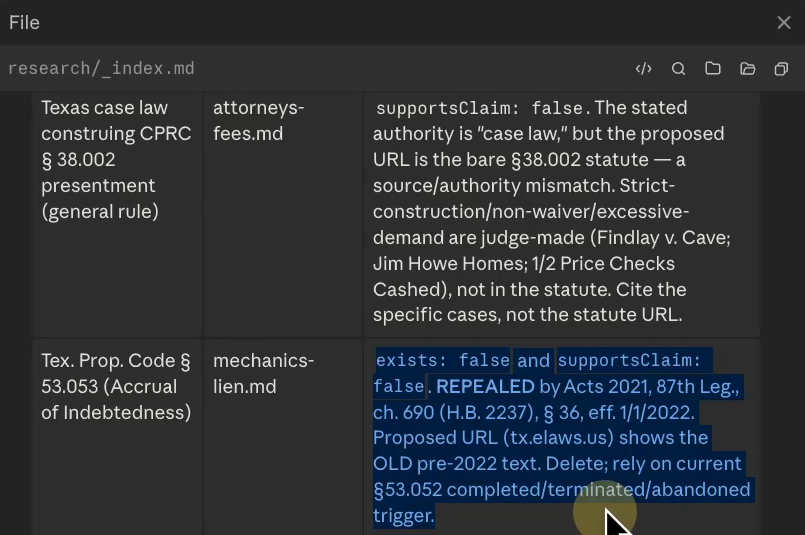
One flagged entry from the recorded run shows what the checking is for. An agent proposed a statute; a verifier found it had been repealed effective 1/1/2022, with the proposed link still showing the old text. A few agents working alone would usually have cited a law that no longer exists. The fifty-plus checking agents caught it before it ever reached a draft.
-
Type /build-case
Instead of one agent doing everything, this puts a team on the matter in three waves that run one after another: research the laws that fit the matter, build the position from the documents and that research, then attack the position the way opposing counsel would.
Result: The build starts, announcing each wave as it runs.
-
Watch the run, or come back in an hour
The case build took about an hour in the recorded run and used 129 agents: 117 on the first wave, 12 on the attack wave. The /workflows command on this page opens the background tasks panel where you can watch each agent, its tokens, and its time.
Result: The build finishes with the research, the position, and the attack recorded in the project folder.
-
Read the research index
The index lists every citation that was cleared, tied to the claims it supports, and a flagged table of citations the verifiers rejected with the reason for each. In the recorded run, 54 were cleared and 36 were flagged. One flagged entry was a statute repealed effective 1/1/2022 whose proposed link still showed the old text.
Result: You can see exactly which law the letter is allowed to rest on, and why.
-
Correct the position, then confirm it
The position report rates every claim by the evidence behind it and answers every defense the other side has raised. The attack wave pulls ratings down to what the file can defend; in the recorded run the retainage claim dropped from solid to soft, with the weak spot named. This stop is a hard one: the letter inherits this page exactly as you leave it, and the legal read here is yours as the lawyer.
Result: A confirmed position the draft will be built on.
Step 3: Draft the letter
The draft is the shortest step, and it opens by handing judgment back to you.
/draft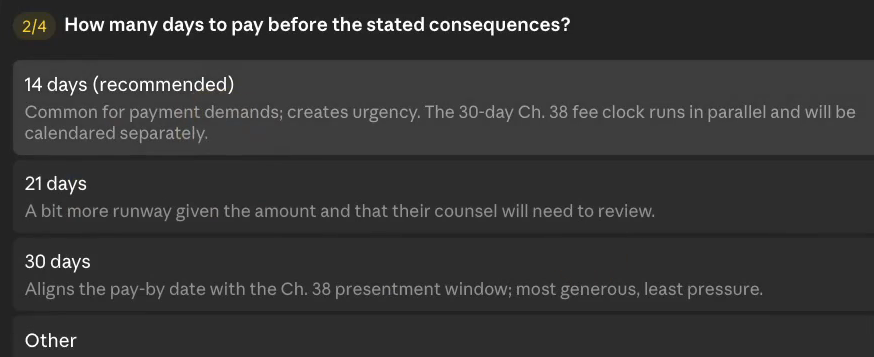
-
Type /draft and answer the judgment questions
Before writing a word, the skill stops and asks four questions: the tone ("Firm / assertive", "Measured", or "Final notice before suit"), the response window, and the rest of the letter's terms. Each has a recommended option, and an "Other" field takes anything you would rather say in your own words.
Result: Your terms are recorded, and the letter drafts from the confirmed position.
-
Open the letter in Word
The draft saves as a Word document in the drafts folder. The recorded run's letter demands $69,450.00 within fourteen (14) days, states interest at 1.5% per month, and carries the Chapter 38 presentment line for attorney's fees.
Result: A review-ready draft on your screen, not a chat answer.
-
Spot check any line back to its source
Every citation in the letter also sits in the research index with the link to the official source it came from. In the recording, the Chapter 38 cite traces from the letter to the index to the statute's own page. The draft is review-ready, never send-ready; a licensed attorney approves everything before it leaves the firm.
Result: You can follow any sentence in the letter back to a source file the build wrote.
The result is a letter you read the way you would read a junior associate’s draft, except the citations arrive already checked once. Claude does the drafting hours; your attorneys spend their minutes on the judgment calls.
Step 4: The paralegal review
The letter looks done. The build treats that as the moment mistakes slip through unread, and brings in a reviewer that had no part in writing it.
/review-
Open a fresh session in the same project folder
You would not hand an associate their own draft to grade. The agents that wrote the letter should not be the ones checking it, so the review runs in a new session whose only knowledge is the finished draft and the file.
Result: A second reviewer with no memory of writing the letter.
-
Type /review and let the review wave run
A new wave of agents fact checks the letter line by line: every citation rechecked against the official source, every quote against the documents, every claim against the evidence, plus a scan for anything that contradicts itself. The recorded run used 26 agents here.
Result: A review report with a verdict, saved into the project folder with the rest of the case files.
-
Read the verdict and approve the fixes
The recorded run's verdict was that the draft needs changes: 4 of 4 citations verified, 8 of 10 quotes verbatim, and one high-severity contradiction, the letter's own closing quietly waiving the reserved interest and fees. It flagged the problem instead of guessing at a repair, and asked.
Result: A corrected letter saves as version 2, with version 1 kept underneath it.
-
Read and sign, or say what to change
This is the last judgment stop, and it is the one that never moves: in your firm, the letter that goes out is the one a licensed attorney read and signed.
Result: A signed letter, with the research, the ratings, and the review record sitting beside it in the project folder.
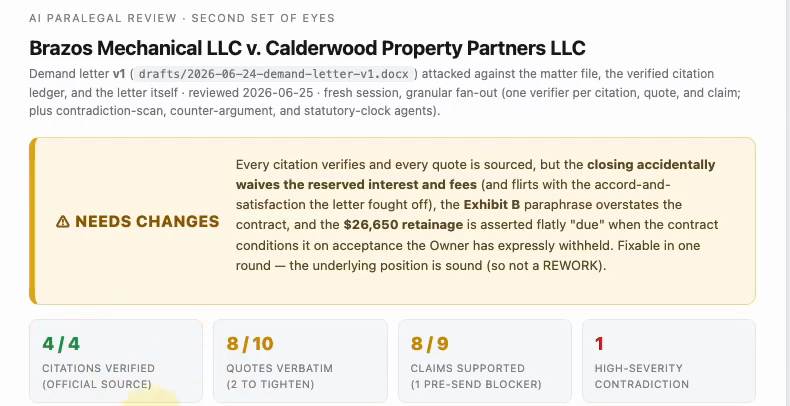
Notice what the reviewer did with its one serious finding: it did not quietly rewrite the letter. It flagged the contradiction, explained it, proposed the repair, and waited for approval. When something cannot be verified, flagging beats guessing, and this build flags.
By the time the corrected letter reaches the attorney, every citation in it has been checked against its source twice: once while the case was built, once by the fresh session. The letter that reaches the attorney is usually far more accurate than a raw first draft, and there is simply less for the reviewer to catch.
Honest limits
- It is not fast. About 12 minutes to organize the matter and about an hour for the case build, in the recorded run. The agents trade time for reliability.
- The skills are free, the app is not. Running this needs the Claude desktop app on a paid plan, Pro or Max.
- It does not replace the lawyer’s read. Four judgment stops are built in, and the letter that leaves the firm is the one an attorney signed.
The four skills are plain text files, and that matters past this one letter. When your firm words its demands differently, you change the file once, and every matter you open after that runs the changed way.