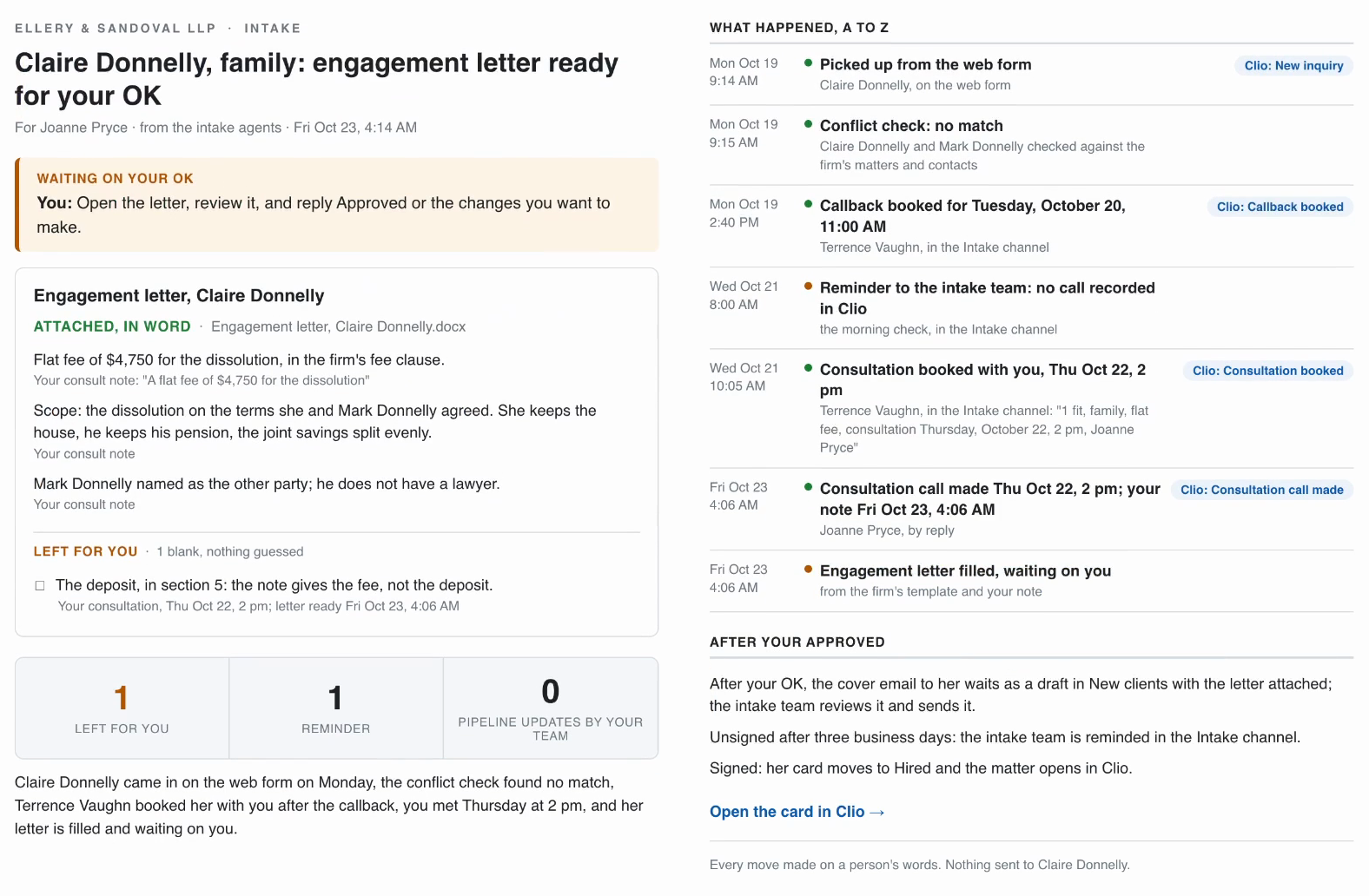
Keeping a law firm’s pipelines clean and updated in Clio takes the intake team too many hours every week, and that is where potential client callbacks get missed. This page follows intake agents that do that work from inquiry to engagement letter. They keep every potential client’s card in Clio current, catch the missed callbacks and the unsigned letters, remind your intake team in Teams, and brief your lawyers by email. One person sets them up for the whole firm, and everyone else works with them from Outlook and Teams. Everything below ran on Ellery & Sandoval LLP, a practice firm in Columbus, Ohio, with family, employment and commercial property groups: fake firm, fake clients, real workflows.
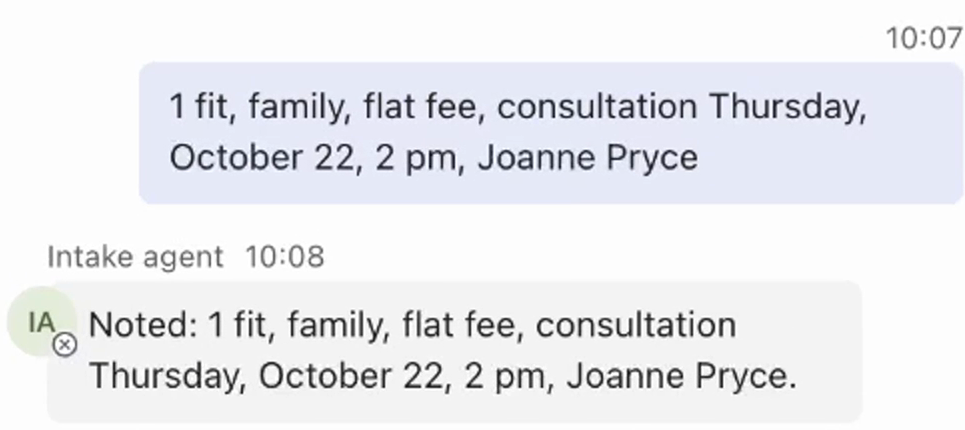
The email at the top of this page is the end of one intake. Claire Donnelly came in on the web form and entered Clio at New inquiry, and the conflict check found no match. The intake coordinator, Terrence Vaughn, booked her callback with one line in the Intake channel, which moved her card to Callback booked. The next morning the intake team got a reminder, because no call was recorded in Clio. Terrence answered it with one typed line, and that line booked her consultation with the head of family, Joanne Pryce, and moved the card to Consultation booked.
After the consultation, Joanne’s note filled the engagement letter, and the email above waits for her OK. The team’s part in all of it was one call, two one-line replies, one consultation and one note.
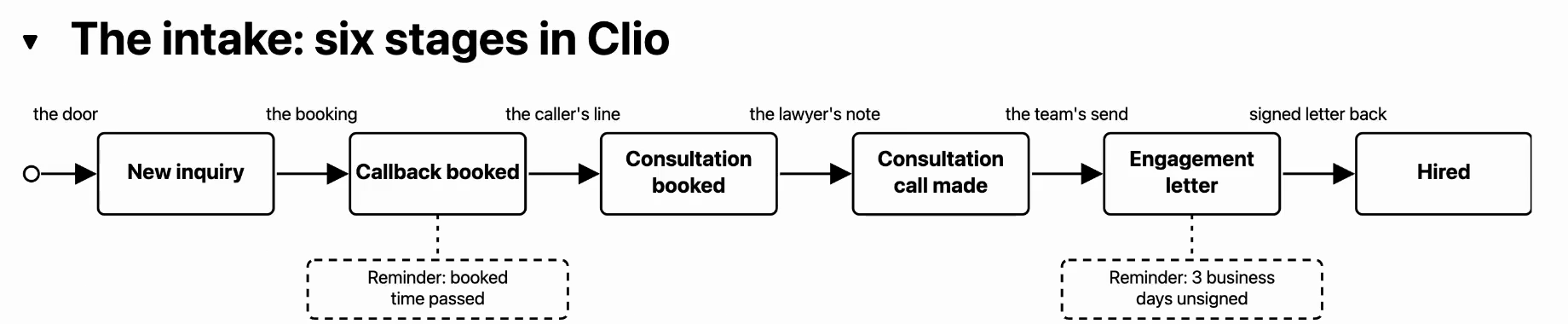
The intake runs on six stages in Clio, from New inquiry to Hired. Each arrow is what moves a potential client’s card to the next stage.
The agents run one loop, the same four moves every time:
- Something comes in or falls due: a new inquiry, a callback, a letter.
- They read it where it already lives, in Outlook, Teams and Clio.
- They do the work, and log every stage move they make on the card in Clio.
- The result comes back in Outlook or Teams, waiting for one of your team where it needs their input.
They know your matters, each group’s rules, and when to remind your team: how long a callback can go without a call, and a letter without a signature. A chat window asks every lawyer to get good at prompting, and ten lawyers give you ten different drafts. The agents are set up once for the whole firm, and everything they know about it, its people, groups and intake rules, sits in plain files in one folder you can open and check, and every inquiry is handled by those written rules, the way your best team member would handle it.
Step 1: Set up the intake agents
One person at the firm does this once: a four-question interview, then the sign-ins, to Microsoft 365 and, where your firm connects it, to Clio.
-
Put the free folder on your computer
The free download sits in the panel at the end of this page. Unzip it anywhere: one folder named Client Intake Agents, with the agents' instructions, their five skills and a handbook, and the files of a practice firm two weeks into its intake. These files are made up, so there's no confidentiality question at all. You can start practicing right away, no client file goes into an AI tool until your firm decides it should, and you don't fall behind in the meantime.
Result: The Client Intake Agents folder sits on your computer.
-
Open the folder in your AI tool
The folder's START-HERE page names the tool this build uses, and any similar AI tool that opens a folder on your computer works as well. Choose the Client Intake Agents folder to work in. The first time, the tool asks permission to work inside this folder: allow it, and it stays limited to this folder.
Result: The agents' folder is open, and nothing is set up yet.
-
Type hi
The folder comes with the agents' instructions, so they know what to do. They introduce themselves as your firm's intake agents and start a four-question interview, one question at a time.
Result: The intake agents are asking their first question.
-
Answer the four questions
First the firm and its city. Second, group by group, who decides whether the firm takes a new matter, who holds the consultations and who signs the engagement letter; the answer also names who gets every inquiry first. Third, when a callback counts as missed, after how many days an unsigned letter is chased, and which Teams channel the reminders go to. Fourth, whether replies to potential clients are drafted for your team to review and send, or stay personal. For a practice run, answer for the practice firm, with your own name or a colleague's wherever an answer names a person, so the agents' emails reach someone at your firm.
Result: The agents write what they learned into the folder named firm and read it all back.
-
Connect Outlook and Teams
The agents work from your firm's own Outlook and Teams, under a Microsoft 365 account of their own, like a new staff member named Intake agent. Before this step, whoever runs your firm's Microsoft 365 creates that account, a shared mailbox called New clients where every inquiry arrives, a team called Front office with an Intake channel, and one mail rule that bounces the agents' mail to anyone outside the firm; the handbook in the folder lists every setting. Type "Connect to our Outlook and Teams", and Microsoft's sign-in opens in your browser: sign in as the agents' account, not your own. The first time at a firm, Microsoft asks an administrator to accept the permissions once, for the whole firm.
Result: The agents can see New clients and the Intake channel, and post a short hello there.
-
Connect Clio, where your firm has it set up
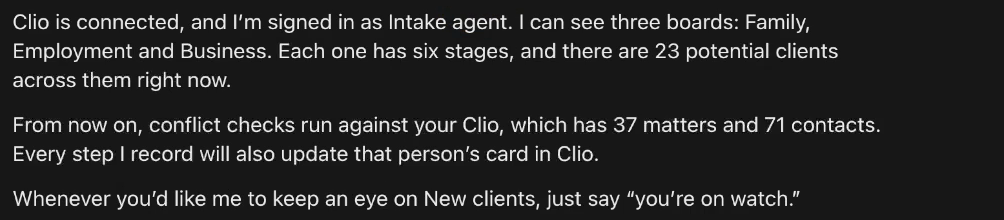
The Clio connection is set up for each firm, on Clio's side, so the free folder does not include it: there, typing "Connect to our Clio" gets one line saying so, and the agents keep the conflict check, the stages and the records in their own files. With the connection set up, the same line opens Clio's own sign-in page, listing what the agents may read and write, and you press Allow access.
Result: On the practice firm's Clio: three boards, six stages on each, 23 potential clients, and the 37 matters and 71 contacts the conflict check reads.
hi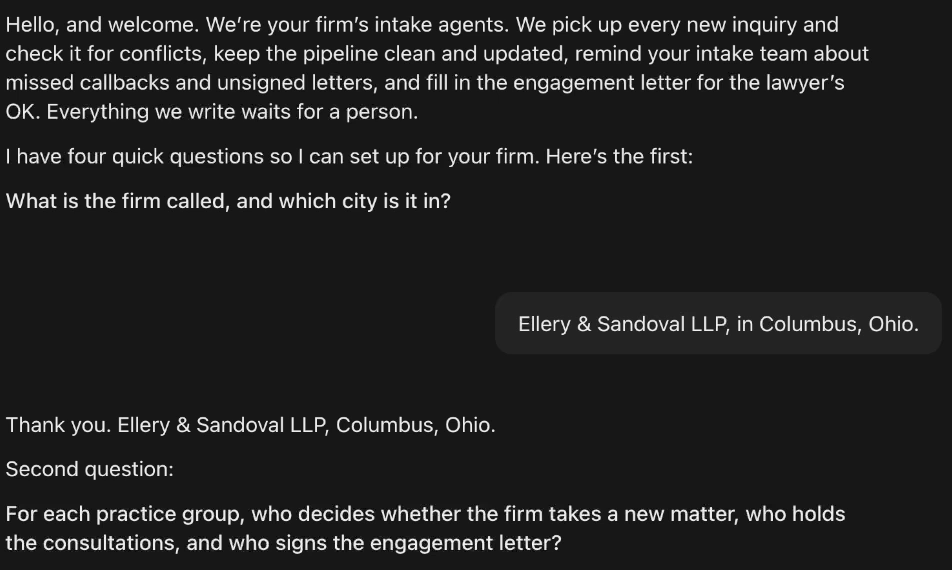
Ellery & Sandoval LLP, in Columbus, Ohio.Family: Joanne Pryce decides, and she and Carla Mendes hold the consultations. Employment: Andrew Sato decides, with Monica Reinholt. Commercial property: George Hallam decides, with Devon Lister. Helen Ellery signs every engagement letter, and every inquiry goes to Terrence Vaughn first.A callback is missed when its time has passed and nobody has logged a call by the next morning. Chase an unsigned letter after three business days. Remind the intake team in Front office, the Intake channel.Family stays a personal call from the intake team. For everything else, draft the reply for the intake team to review and send.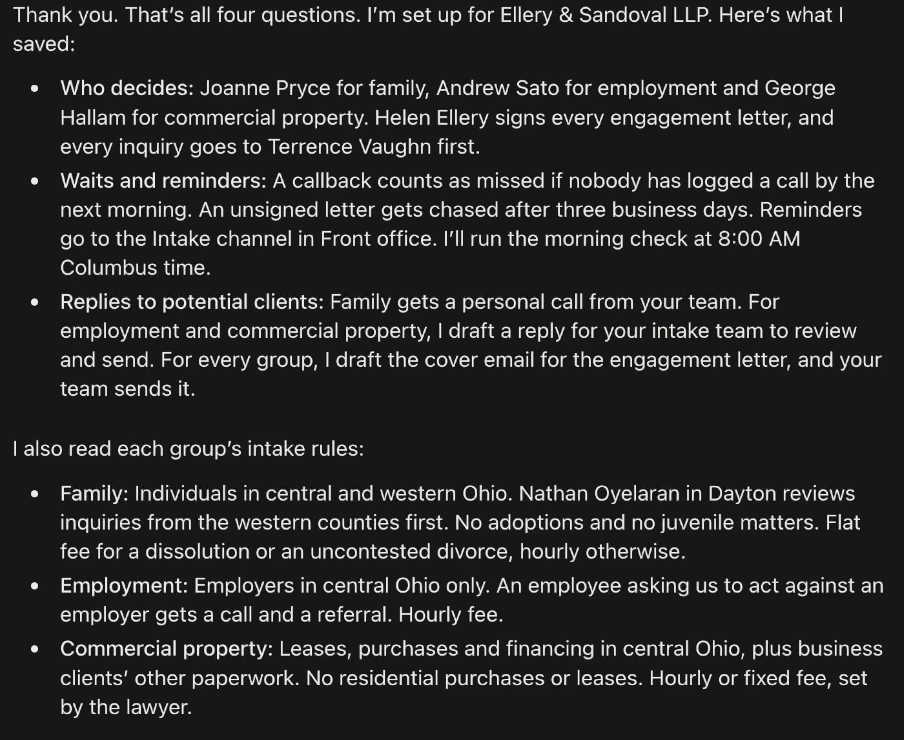
A skill is one of your firm’s processes, written down once, in plain English: the same idea as your SOPs. The four questions come from one, the interview skill, and the free folder carries five. With your own firm, put your engagement letter template, each group’s intake rules and your intake SOPs in the agents’ folder, and from then on they work from those.
Connect to our Outlook and Teams
Connect to our Clio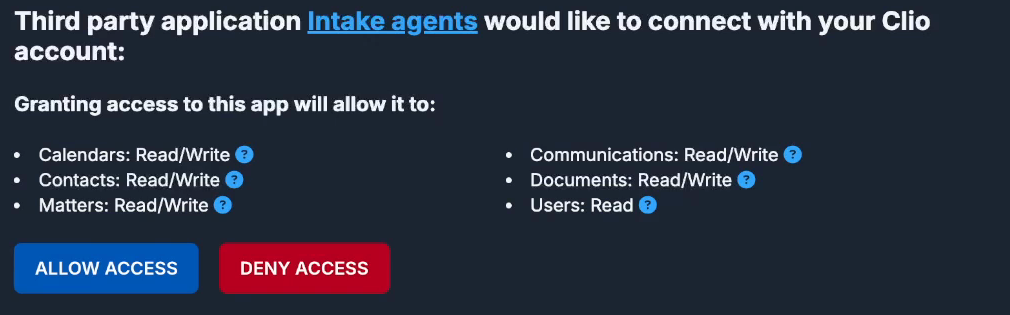
Step 2: Check every new inquiry
Every inquiry in an area the firm handles gets the conflict check first, before anything is written. A possible conflict goes on hold, with only the name and On hold on its card in Clio. The rest get their card in Clio with the details and a briefing for whoever makes the callback, and the one inquiry the firm does not handle gets a call sheet with where to refer the caller.
-
Let the new inquiries land in New clients
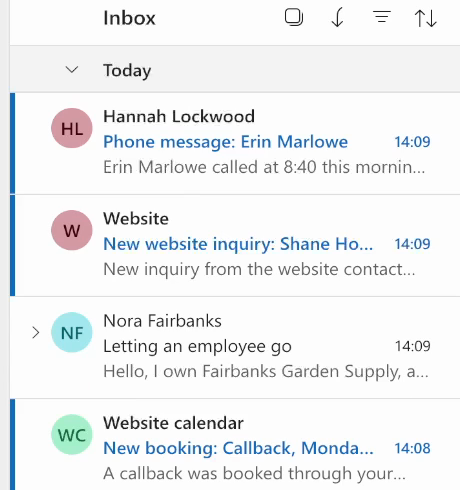
Every door sends its inquiry to the shared mailbox. On the practice firm, four came in one morning: a callback booked on the website calendar, an email, reception's phone note and the web form. The free folder ships those four as practice files; send each one into New clients from your own Outlook.
Result: Four new inquiries sit in New clients, each from a different door.
-
Type "Check the new inquiries."
Every inquiry in an area the firm handles gets the conflict check first, against the names in Clio's matters and contacts, before anything is written. A possible conflict puts the inquiry on hold, and the agents stop there and draft nothing.
Result: The agents work through the four, one at a time, and report one line per inquiry.
-
Read what they did with each one
Kayla Brennan's family callback went to the intake coordinator as a callback brief, and nothing was drafted to her, because family stays a personal call at this firm. Fairbanks Garden Supply had no match so far: a reply waits as a draft in Nora Fairbanks's own thread, beside a brief for the coordinator. Shane Hoffman's matter is outside the firm's work, so no conflict check ran and a call sheet went to the coordinator. Erin Marlowe is on hold on a possible match.
Result: Every inquiry has its next step, and nothing went to a potential client.
-
Leave the hold to the head of the group
The hold goes to the head of family with the managing partner copied: the possible match, where each fact came from, and one decision for the lawyer, answered in one reply that clears the inquiry or declines it. Until the head of family replies, the agents tell nobody else at the firm, not even the intake team, and her Clio card shows only her name and On hold.
Result: The lawyer decides the conflict; the agents only found it.
-
Make the callback with the brief
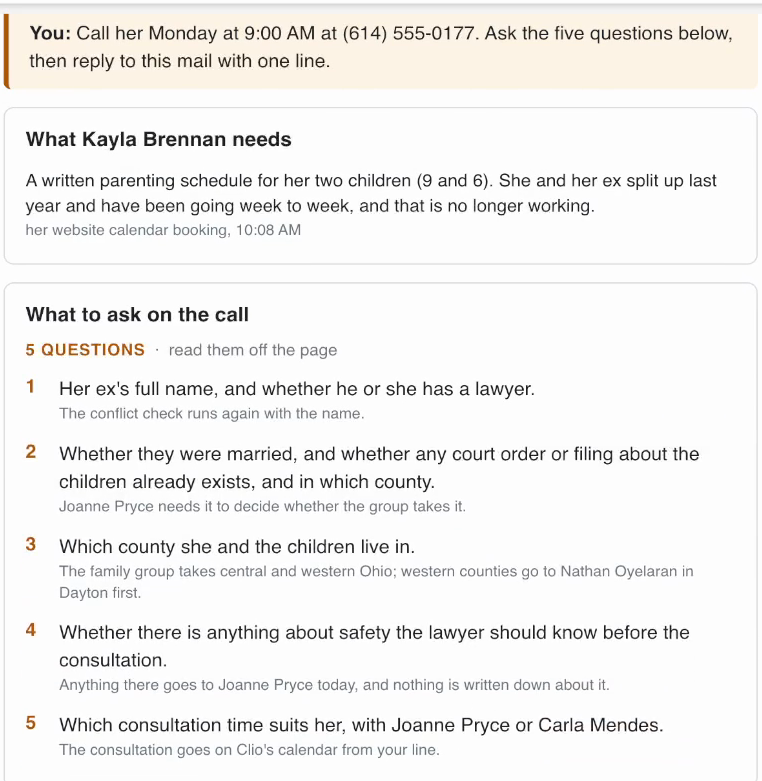
The coordinator's brief says when to call, five questions to ask, each with its reason, and three lines to copy as the reply afterwards. The questions come from the firm's own intake rules in the agents' folder: here the third asks which county she lives in, because this firm's family group takes central and western Ohio and the western counties go to its lawyer in Dayton first.
Result: Whoever makes the call has the firm's own questions in front of them.
-
Review the drafted reply
Where the firm wants replies drafted, the agents write one in the inquirer's own thread in New clients, with Outlook's draft marker on it, in the firm's words from the reply template in the folder. They cannot send it, even by mistake: their mail tool writes only to people at the firm, and a mail rule in this firm's Microsoft 365 bounces their mail to anyone outside it.
Result: Your team reviews the draft and sends it.
-
Answer the call sheet in one line
The inquiry outside the firm's work gets a call sheet: the line to say, the bar association's lawyer referral service, and the caution to give on the call. After the call, the coordinator replies to the sheet with one line, and the non-engagement letter that follows stays the firm's own, written and sent by your team. For the agents to pick that line up by themselves, put them on watch first: while the app is open, they wait in the background for anything that arrives in New clients, their own inbox or the Intake channel.
Result: The agents close his card in Clio as referred out.
Check the new inquiries.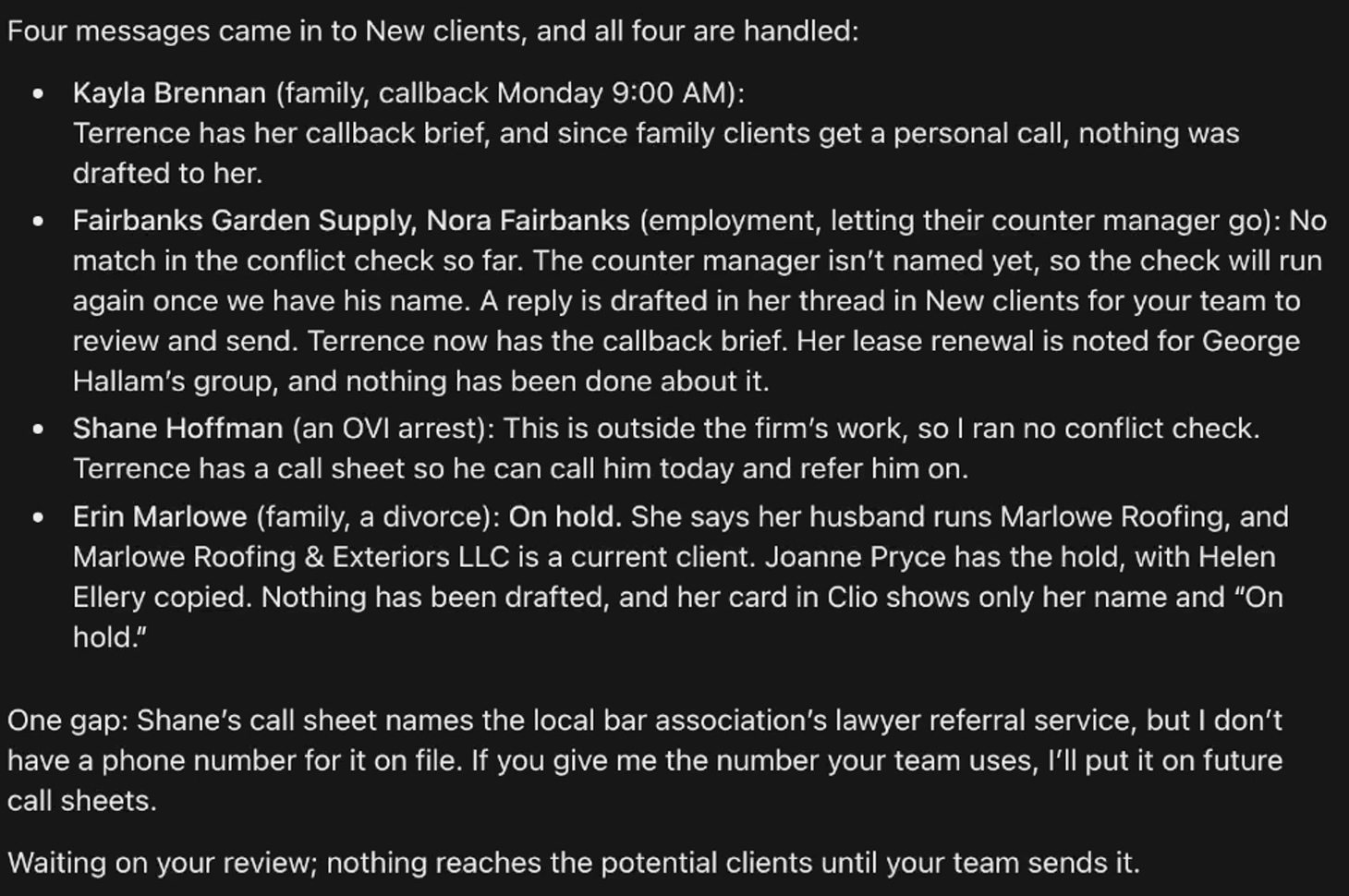
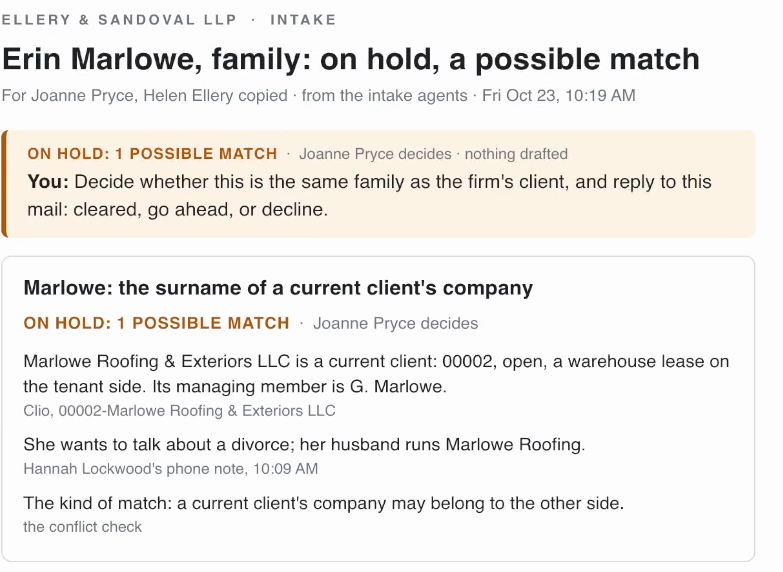
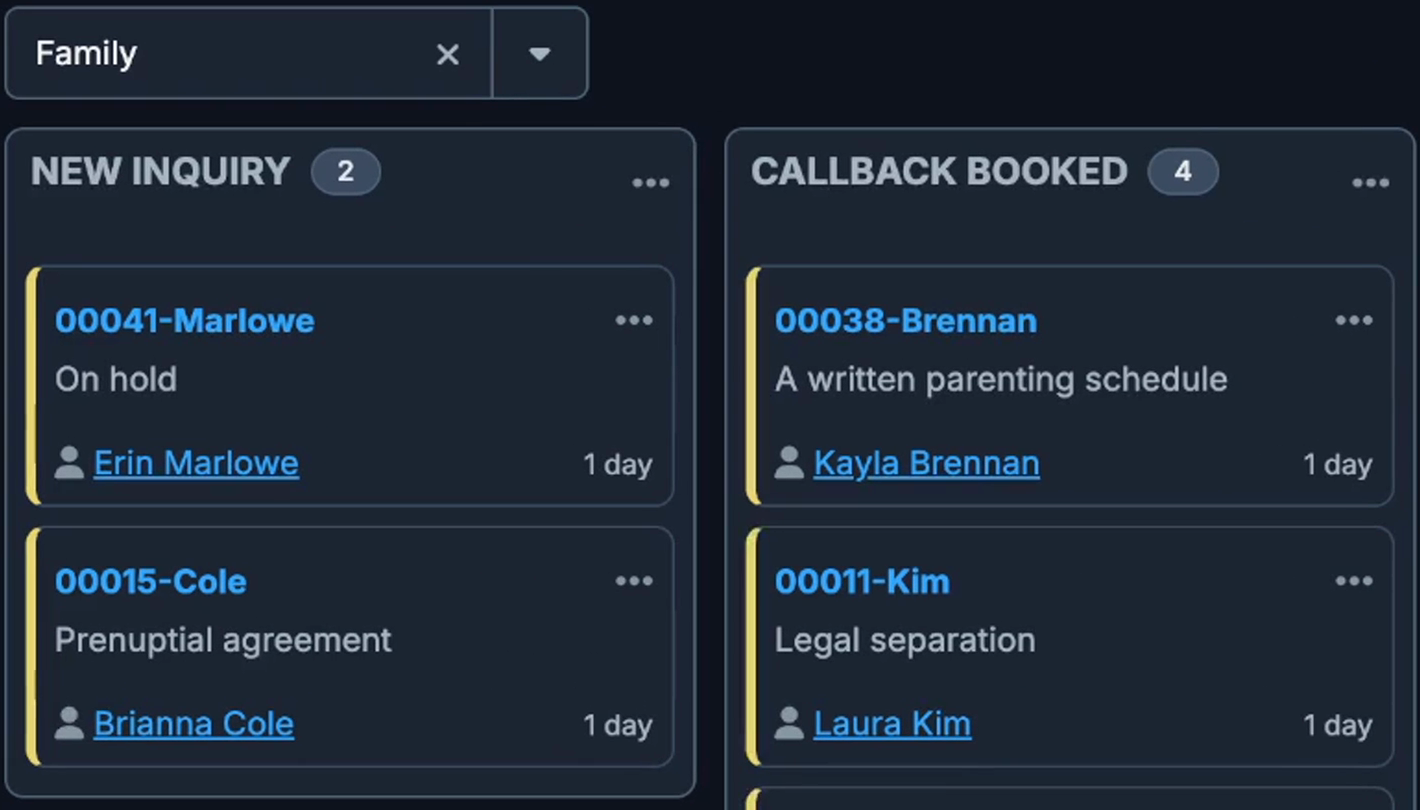
That is why the check runs before anything is written: until the head of family decides, her card in Clio holds nothing but her name and On hold, and the agents tell nobody else at the firm about the inquiry.
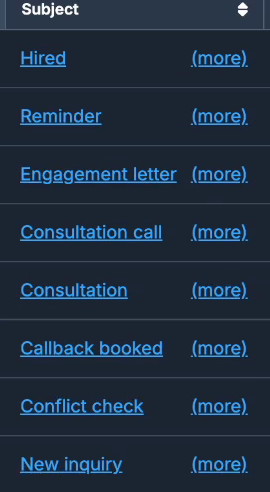
Every time a card moves in Clio, a specific trigger moved it, for example the inquiry arriving in New clients, or a one-line reply from your team in Teams or by email. Each move leaves a note on the card, so the potential client’s whole history is there.
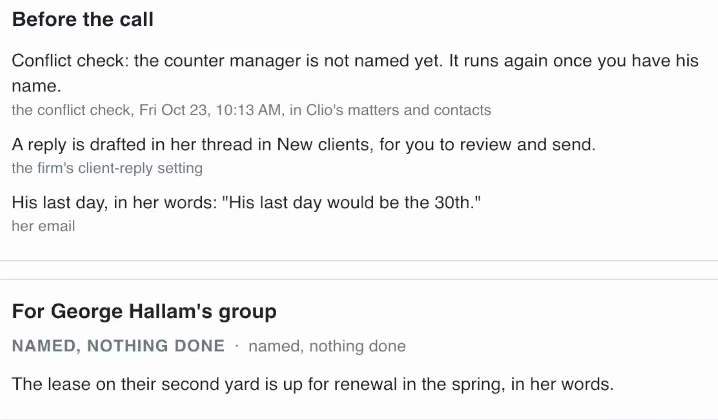
Calls and emails to clients stay with your team, for the personal touch: if you are going through a divorce, you probably do not want an email from an AI. Where a reply helps, the agents draft it for your team to review and send.

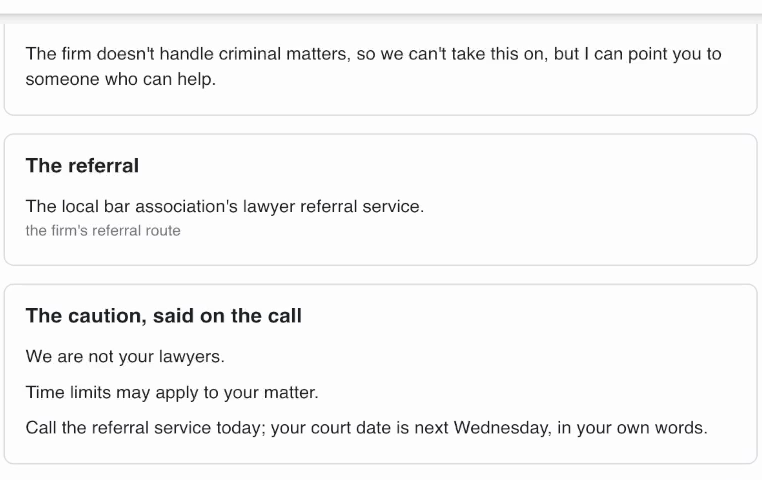
You're on watchCalled, he has the referral service's number.
That is the morning’s four inquiries handled, and the board in Clio kept current.
Step 3: Catch the missed callbacks
With the new inquiries on the board, the next part is the potential clients already on it who are still waiting for a call. A callback whose booked time has passed, with no call recorded in Clio by the next morning, gets your intake team a reminder in Teams.
-
Run the morning check
On watch, the agents run it by themselves every morning at 8:00 AM, the firm's time: they go through every potential client on the boards and post one reminder in the Intake channel for each callback with no call recorded and each engagement letter with no signature recorded. The first time, type "Run the morning check".
Result: Five reminders in the Intake channel: three callbacks with no call recorded, two letters unsigned.
-
See who was left out
A call already on record means no reminder. Laura Kim had a callback booked as well, and her call was recorded, so the agents left her out: they remind your team only about the calls nobody made.
Result: No reminder about work your team already did.
-
Answer a reminder with one number
Whoever made the call replies under the reminder: 1 if it is a fit, with the group, the fee type, and the consultation's date, time and lawyer; 2 if it is not a fit, with the reason; 3 if nobody has called yet, with when. The agents answer under it with Noted and the line repeated, so the writer knows it was handled.
Result: A 1 books the consultation; a 3 keeps the card where it is, and the reminder comes back the next morning.
-
Watch the card move in Clio
From the one line, the agents move the card to Consultation booked, put the consultation on Clio's calendar on her matter with the lawyer named, and email that lawyer a consult prep: five points to cover, each with its reason, and what her reply after the call should say.
Result: The lawyer has the consult prep before the call, and the board in Clio is current.
Run the morning check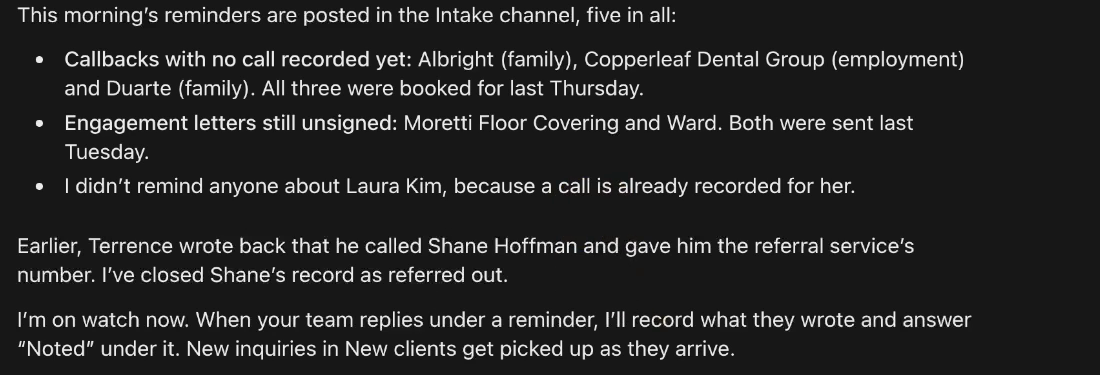
1, fit, family, flat fee, consultation Tuesday, october 27th, 2pm, Carla Mendes3, calling her at 4 today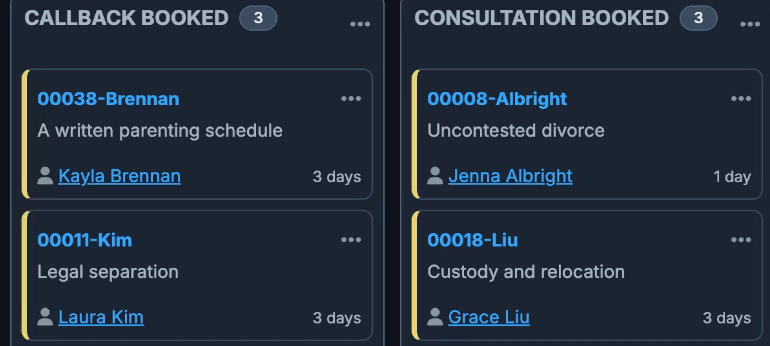
The calls stay with your team. Everything around them, the conflict check, the cards in Clio and the follow-ups with your intake team, is the plumbing: the hours your team spends keeping pipelines clean and updated in Clio. That is the work the intake agents do.
Step 4: Fill the engagement letter for the lawyer’s OK
After the consultation comes the lawyer’s consult note, and the engagement letter filled from it. This step goes back to Claire Donnelly from the top of the page, whose consultation with the head of family has happened.
-
The lawyer replies with her consult note
After the consultation, the lawyer replies to the consult prep with her note: what was agreed and the scope, the fee in her own words, and the other side and whether he has a lawyer. It is a reply to the agents, so it arrives in their own inbox, and on watch they pick it up by themselves.
Result: Her note moves the card in Clio to Consultation call made.
-
Read the letter the agents filled
They fill the firm's own engagement letter template from the note: the scope on the terms the two of them agreed, the lawyer responsible, and the flat fee of $4,750 quoted from her note. The deposit is the lawyer's decision, so section 5 stays a bracket instead of a guess, flagged under Left for you.
Result: A Word document from the firm's template, waiting in the lawyer's Outlook for her OK.
-
Approve it, or ask for the change
The lawyer replies in the same thread with Approved or the change she wants. Here she approves with no deposit, and the agents answer that section 5 now says there is none, that nothing else changed, and attach the new version.
Result: The letter with her change waits in her thread as version 2.
-
The intake team sends it
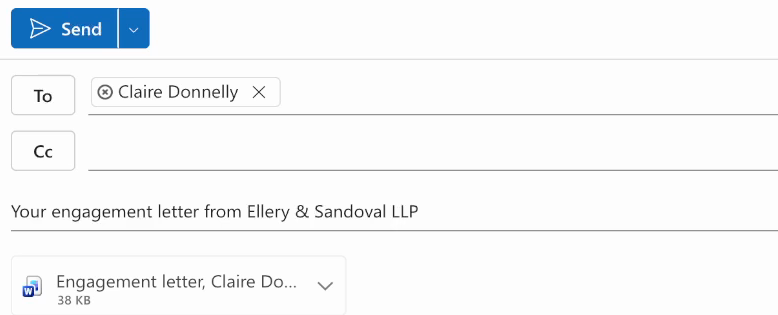
On the Approved, the agents draft the cover email to the potential client in New clients with the letter attached, and post in the Intake channel that it waits there. The coordinator opens New clients, reads the draft and presses Send.
Result: The coordinator's own send moves the card to Engagement letter and files the letter on her matter in Clio.
Met with Claire yesterday afternoon. They agree on everything, so we will file it as a dissolution. She and Mark agree on the division: she keeps the house, he keeps his pension, and they will split the joint savings evenly. Both children are adults. Mark does not have a lawyer and does not plan to get one.

A flat fee of $4,750 for the dissolution, as we discussed. Please get the engagement letter ready for my review.

Joanne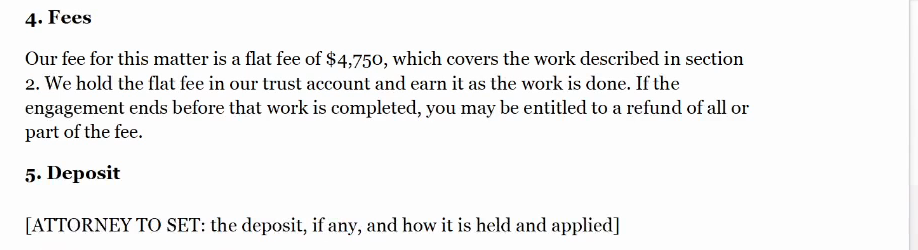
Approved, no deposit for this one.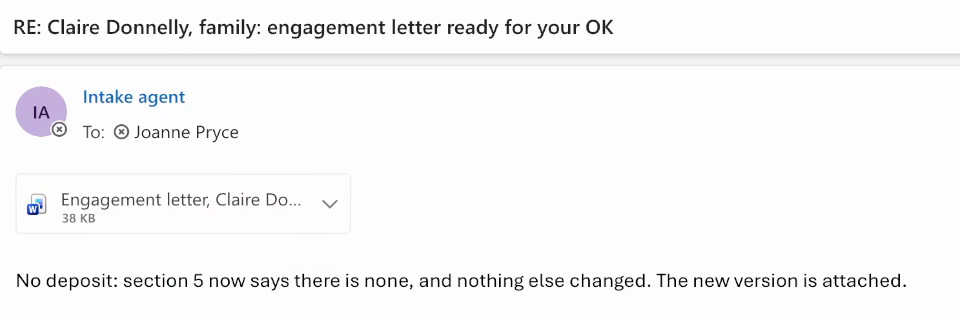

Review-ready, never send-ready. A licensed attorney approves the engagement letter before it leaves the firm. The lawyer’s note moved the card once, the coordinator’s own send moved it again, and nobody at the firm moved a stage by hand in Clio.
Step 5: Chase unsigned letters and open the matter
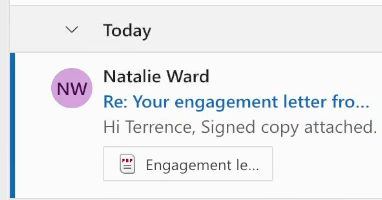
Two reminders about unsigned engagement letters are still waiting in the Intake channel from the morning check: one for Natalie Ward, one for Moretti Floor Covering.
-
Let the morning check catch the unsigned letters
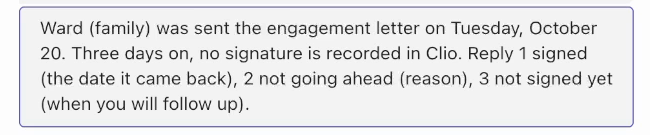
A letter still unsigned three business days after it went out gets your intake team a reminder in the Intake channel, asking them to chase it and answer with one line: 1 signed, with the date it came back; 2 not going ahead, with the reason; 3 not signed yet, with when they will follow up.
Result: The team knows which letters to chase, with nobody counting days.
-
The signed letter comes back
When the potential client replies with the signed copy attached, it arrives in New clients, and that is the client's yes. On watch, the agents pick it up by themselves: a mail from the address on her card, while the card is at Engagement letter and after her letter went out, with a PDF or Word file attached whose name holds "signed" or "engagement letter". Anything uncertain they set aside with one line, and move nothing.
Result: Nobody at the firm types a thing.
-
The matter opens in Clio
The agents move her card to Hired and open the matter in Clio: status Open, the day her signed letter arrived as the open date, and Clio's own matter number. They file the signed copy in the matter's documents beside the letter that went out, post in the Intake channel, and reply under her morning reminder, so that thread closes without anyone typing a reply.
Result: A matter opened in Clio, with the data on the card complete.
-
Answer the ones still out
A letter still unsigned stays where it is. The coordinator answers its reminder with a 3 and when the call will be, and the card waits in Clio until the signed letter comes back.
Result: Noted under the reminder, and the card stays at Engagement letter.
-
Read the whole intake on the matter
The matter's notes cover the intake from start to finish, one note per step from new inquiry to hired, each with its date, the responsible lawyer named, and the last one ending on her own email to New clients. A partner who signs off on new matters can read it in one place, and whoever builds the monthly intake numbers can count them from the board in Clio.
Result: The board is current, and every card carries its own history.

3, calling her tomorrow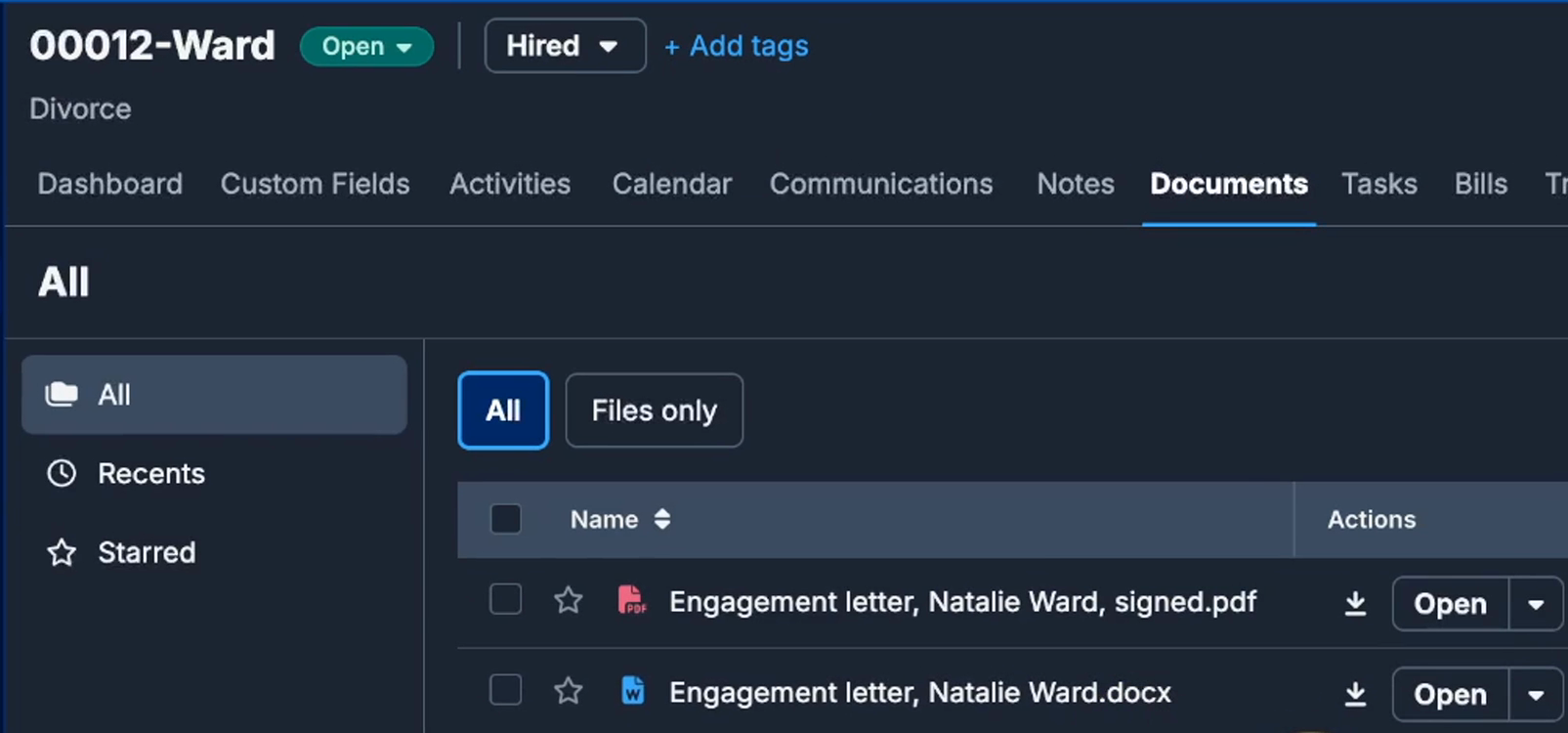
So the whole client intake ran from the web form to a matter opened in Clio. Your team’s part was making the calls, answering with one line in Teams or by email, one consult note, one approval on the engagement letter, and pressing Send in Outlook.
Honest limits
In the free folder, these agents have four honest limits right now, and they are better heard here than found out at your firm later.
- Office hours: the agents are on watch only while the app is open, and off when it is closed. An inquiry that comes in on Friday night waits until someone opens the app on Monday.
- Nobody monitoring them: if they stop in the middle of the morning, a connection dropped or a sign-in expired, nobody gets an alert to fix it. Once your intake relies on them, a silent failure at the wrong moment is expensive.
- Not connected to your Clio: the connection on this page is set up per firm, on Clio’s side, and a public download cannot carry one firm’s setup. The free folder keeps the conflict check, the stages and the matter cards in its own files until that connection is set up for your firm.
- The generic version, with nobody maintaining it: it works, but it is not built around your firm’s intake process, your templates or your groups’ rules. As those change, and as the AI underneath changes, nothing in the folder changes with them.
Your lawyers never learn an AI tool. The drafted documents just show up in their email. Nothing about how your team works changes either: the agents read the data where it already lives, in Outlook, Teams and Clio.
I am not a lawyer; I set up AI agents like these for law firms. One person sets the agents up for the whole firm, and with the free folder, that person is whoever at your firm follows this page. For the firms that would rather it be me, I build the agents around your firm, from your SOPs, your templates and your best lawyers’ example documents, one at a time, each one improved until your team uses it. The managed version is watched 24 hours a day, so if anything fails, you hear about it from me, and it is kept current as your firm changes. The agents run in our own Microsoft Azure, or in your firm’s own if you prefer. On a call you see agent workflows built for your firm’s recurring work, with real outputs, and your first agent is live within 48 hours of kickoff. The managed-version card in the panel below is that path, or message me on LinkedIn; the free folder beside it is the build on this page without the Clio connection, and the right place to start.