Lawyers ask this question before any other, for a plain reason: a law firm holds client files, and a mistake with client files is never small. This page covers what decides safety, the checks to finish before real matters go in, and a first test that touches no client data.
What decides whether Claude is safe
Three choices decide it, and the firm makes all three.
- The plan. A personal subscription (Pro or Max), a firm plan (Team or Enterprise), and the developer API run under different terms. The terms decide how your data is handled.
- The settings. On personal plans, whether conversations may be used for model training is a setting the account holder controls. On commercial plans, data handling is a contract term.
- The practice. What goes into the tool, and who reviews what comes out. A firm that pastes a live client file into an unvetted tool has already made the unsafe choice, whatever the tool. Fictional test matters plus attorney review put the firm in a defensible position with any serious tool.
Training and retention, in short
The plan class decides it. On the Team plan, the Enterprise plan, and the API, Anthropic states customer data is not used for training by default. On Free, Pro and Max, training permission is a toggle the account holder controls, and retention follows that choice: Anthropic states that chats shared for training can be kept in de-identified form for up to 5 years, while turning the toggle off keeps the standing 30-day retention period. The table below gives the plan picture, and the full walkthrough, quote by quote, belongs to a page of its own: Does Claude train on client data?
| Plan | Model training on your data | Who controls it |
|---|---|---|
| Free, Pro and Max | Your choice. The setting is called Help improve our AI models, and it can be turned off. | The account holder, in the privacy settings |
| Team and Enterprise | Not used for training, by default. | The firm, through its agreement with Anthropic |
| Developer API | Not used for training, by default. | The firm, through the commercial terms |
Terms change. Verify them on the day you decide, from the sources at the bottom of this page, and note the date. The stamp at the top tells you when these facts were last checked.
What the confidentiality duty asks of the firm
The duty of confidentiality does not ban cloud tools. Firms already trust hosted email and hosted document systems with client files every day.
The standard is reasonable effort: understand where the data goes, what the vendor may do with it, and whether that matches what you promised your clients. The American Bar Association reads the existing rules onto generative AI in Formal Opinion 512, its 2024 opinion on the subject, and the rules it applies are the familiar ones: competence with the tools the firm uses (Model Rule 1.1), protection of client confidences (Rule 1.6), and supervision of nonlawyer assistance (Rule 5.3). Those duties are the ones this page keeps returning to. Understand the tool, protect confidences, verify the output, and supervise the work the way you supervise a junior associate. The wider ethics picture is a page of its own: Can lawyers ethically use Claude?
Are Claude chats protected by attorney-client privilege?
Confidentiality is a duty the firm owes its clients. Attorney-client privilege is a different protection: a rule of evidence that can keep what a client tells a lawyer out of an opposing party’s hands. It covers confidential communication with a lawyer for the purpose of legal advice, and it can be lost when that information is shared outside the lawyer-client relationship.
A chat on a personal Claude account is not communication with a lawyer, and a federal court has now said so. In United States v. Heppner, decided in the Southern District of New York in February 2026, the court held that a defendant’s chats with Claude on his own consumer account were neither privileged nor protected work product. The reasons: Claude is not an attorney, the consumer terms undercut any expectation of confidentiality, and the work was not done at his lawyers’ direction. The client alerts law firms published on the ruling point the same way: AI use on a live matter belongs under counsel’s direction, agreed before anything sensitive goes into a chat.
Firm-controlled use is a different situation, and not an automatically protected one. Anthropic’s own help article on legal work reads the ruling the same way: the outcome turned on the consumer terms and on the absence of attorney direction. The same article points to other rulings where AI-assisted litigation preparation, run under lawyer direction, kept its work-product protection, and its standing advice is to keep a lawyer visibly directing the work, so that the output is the attorney’s draft rather than a substitute for advice. That is the supervision duty from the section above, applied to a newer tool, and it is why the review step closes the test at the end of this page.
Nothing here is legal advice, and privilege questions on a live matter belong to the firm’s own lawyers. The careful position for a firm that is evaluating Claude is short: assume a personal AI chat carries no privilege, keep matter work inside accounts the firm controls, and keep lawyers directing the work.
Where Claude is not safe
An honest answer includes this part. Claude is not safe as an unsupervised sender of legal work. It can produce a confident answer that is wrong, and it can cite a case that does not exist. Courts have sanctioned lawyers who filed AI-invented case citations no one had checked.
The fix is a written process: every citation gets verified against the source, and every document gets attorney review before it leaves the firm. Treat everything it produces as review-ready, never send-ready. With that rule standing, the risk stays inside the firm, where the firm can manage it.
The four checks before real matters
Before a real matter touches the tool, the firm should be able to answer four questions in writing. Each check links to the step on this page that settles it.
Write the answers down. A safety practice that lives in one partner’s head does not survive busy weeks.
A safe first test, step by step
The safest first run touches no client data at all, and it still tells you the truth about the tool, because the workflow is real even when the matter is fictional. Work through the five steps in order.
-
Pick a plan the firm controls
For client work that means the Team plan, the Enterprise plan, or the API, where Anthropic states data is not used for training by default. A personal plan can carry this first fictional test, as long as someone at the firm owns its settings.
Result: The firm knows which terms apply before any document goes in.
-
Turn off model training on any personal account you will use
The direct route is claude.ai/settings/data-privacy-controls. New accounts pick a preference during signup, so open the page anyway and confirm where the toggle stands.
In the app: Your name (settings menu) → Settings → Privacy → Help improve our AI models → off
Result: Anthropic states that new chats and coding sessions will not be used for future model training.
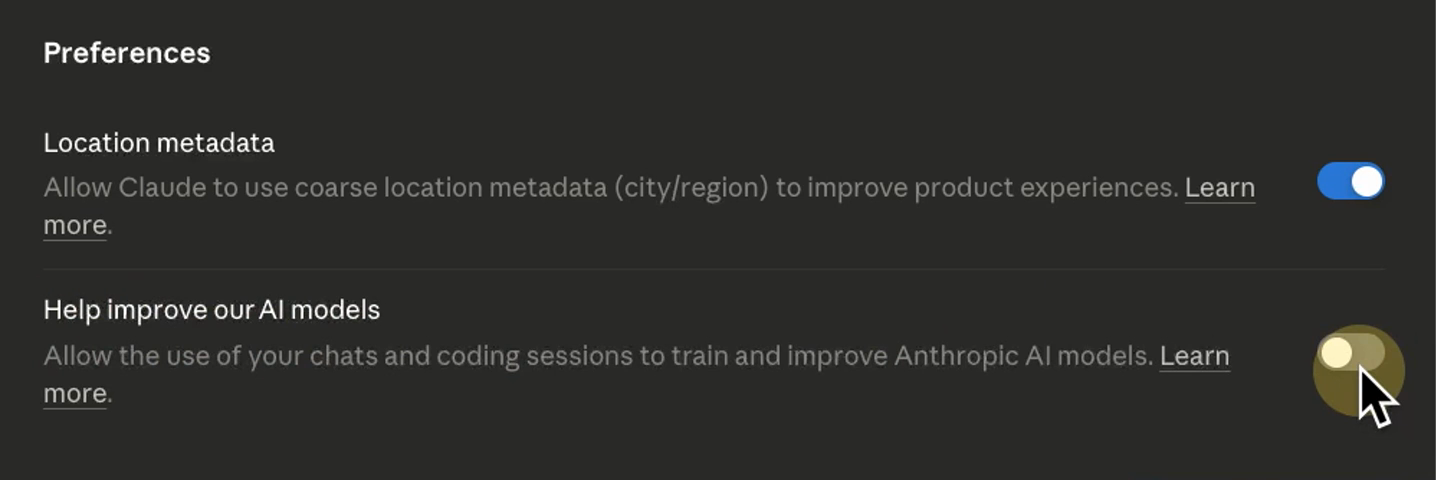
The Privacy settings page, with Help improve our AI models toggled off. Frame from the build video Claude Fable 5 for Lawyers: Redlining Contracts. -
Build a fictional matter
A made-up client, a made-up dispute, and two or three files that look like your real intake. Fake firm, fake clients, real workflows. The first prompt below has Claude draft this matter for you.
Result: A realistic test file that contains no client information.
-
Run one real piece of firm work on it
Open a new chat and paste the first-test prompt below, filled in with your fictional facts. A demand letter makes a good first test because a finished letter is easy to judge.
Result: A draft letter for attorney review. After review it is either usable or it is not, and both results tell you something true.
-
Keep a licensed attorney between the tool and the world
Every document, every time: review-ready, never send-ready.
Result: Nothing AI-drafted leaves the firm without an attorney approving it.
The two prompts below carry steps three and four. The first one has Claude build the fictional matter itself. Copy it into a new chat, name your practice area, and keep what comes back as your test file.
You are creating a fictional test matter so a law firm can evaluate
an AI tool without touching client data. Everything you produce must
be invented. No real people, no real companies, no facts from any
real matter.

Practice area: [YOUR PRACTICE AREA, FOR EXAMPLE: COMMERCIAL DISPUTES]

Produce, in this order:
1. A matter summary in five lines or fewer: a fictional client, a
   fictional opposing party, the dispute, and the amount in dispute.
2. Two or three intake-shaped files of the kind this practice area
   sees, each under its own heading. For example: an intake note, a
   short email from the client, and a list of unpaid invoices, with
   realistic dates and amounts.

Rules: start every file with the line FICTIONAL TEST MATTER. Invent
every name. If an invented name matches a real business, change it.
The second is the first-test prompt from step four. Fill the brackets with facts from the fictional matter above and paste it into a fresh chat.
You are drafting for a licensed attorney who will review and edit
everything you produce. This is a test matter. Every name and every
fact in it is fictional.

Draft a demand letter for the following matter:

- Client: [FICTIONAL CLIENT NAME]
- Opposing party: [FICTIONAL BUSINESS NAME]
- Dispute: [ONE SENTENCE, FOR EXAMPLE: UNPAID INVOICES FOR DELIVERED GOODS]
- Amount owed: [AMOUNT]
- Response deadline: [DATE, TWO WEEKS OUT]

Structure the letter in three parts:
1. The facts, in neutral language.
2. The demand: the amount and the date it is due.
3. What happens if the deadline passes, stated once, without threats.

Rules: plain English, no case citations, one page at most. Where a
fact is missing, write [MISSING: WHAT YOU NEED] instead of inventing it.
To watch a full build of this kind, or to have one set up for your firm, the two cards below are the places to go.
YouTube
Watch a build like this recorded end to end
Every AI employee build gets published start to finish, working screen on camera.
Open the channel
The service
Have an AI employee set up for your firm
The author sets these up for small law firms. What it costs and how it works, on one page.
See the service